


An open-source Agent Skill now lets AI agents like Claude Code and Codex compose instrumental music the way a human composer does, one note at a time. The agent picks the song structure, writes the melody and harmony, assigns parts to dozens of instruments, then plays the score back with samples of real instruments and mixes and masters the result. The sound never comes from a generative audio model. What you get back is an MP3 and WAV, plus MIDI, a separate stem for each part, and an editable project where you can change a single note and re-render only that part. The project is called music-skill, uses the MIT license, and was released in early November.
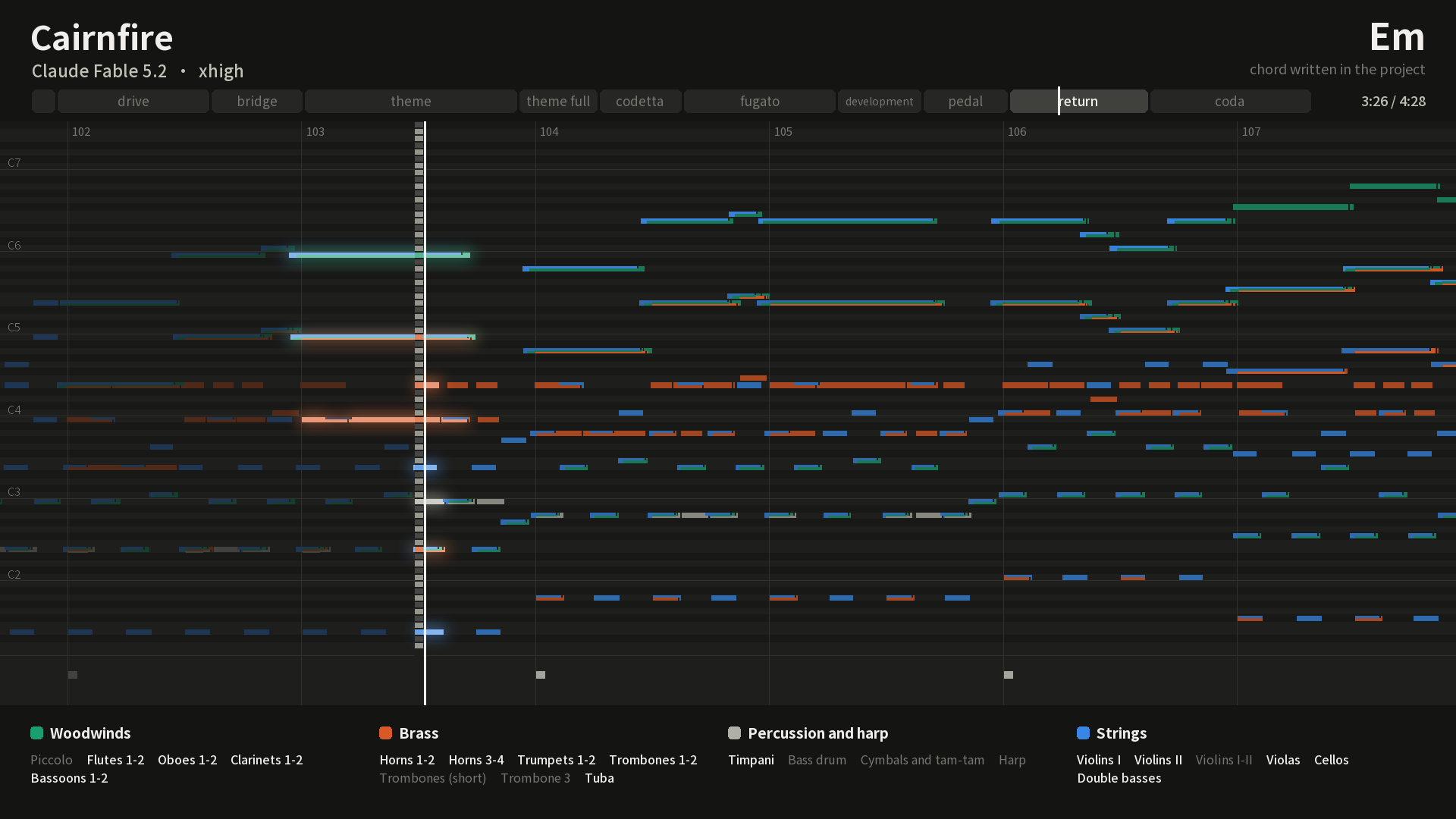
The image comes from the project repository. It shows the project file for Cairnfire, an orchestral overture written by Claude Fable 5.2 with 36 parts and a running time of 4 minutes 29 seconds.
How it differs from one-sentence AI music tools
Most popular AI music tools take a text description and return a finished audio file. The result can sound good, but if you want to change the melody in bar 33, you have to regenerate the whole track, and there is no clear way to tell where any given sound came from.
music-skill takes a different route:
| One-sentence AI music | music-skill | |
|---|---|---|
| Who writes it | An audio model synthesizes the sound directly | The AI agent writes the score, spelling out the pitch and duration of every note, with dynamics you can adjust separately |
| Can you fine-tune it | Usually you start over | Pick one bar or one part to change, and only that section is re-rendered |
| What you get | One audio file | Finished audio and MIDI, plus stems and a project file |
| Where the sounds come from | Learned by the model | Recordings of real instruments (mostly CC0 public domain) and built-in synthesizers |
| Best for | Quickly making a mood track | Scoring videos and games, where length matters and revisions are frequent |
The last row is where it gets interesting. If your AI agent is already editing a video or building a game, it knows how long each shot runs, when the narration starts, and how long a level loop lasts. It can write the music to match those numbers, and when the edit changes, it only rewrites the bars that moved.
Seven example pieces from the author
The repository includes seven finished pieces. Each one came from the same opening instructions plus three or four sentences of brief, written in a single pass with no interruptions or revisions.
| Work | Style | Length | Model |
|---|---|---|---|
| Cairnfire | Full-orchestra overture, 36 parts | 4:29 | Claude Fable 5.2 |
| Stormglass Gambit | Game battle loop, synthesizers | 3:07 | Claude Fable 5.2 |
| Glass Towers, Low Gear | City pop for cruising downtown after dark | 3:03 | Claude Opus 5.5 |
| The Stone Vault Turns to Light | Organ toccata | 3:56 | GPT-6 Astra |
| Paper Lantern Hours | Loopable lo-fi beat | 2:10 | Claude Sonnet 5.5 |
| Fughetta in D minor | Baroque-style short fugue, harpsichord and strings | 2:00 | Claude Opus 5.5 |
| Skybutton Speedway | 8-bit game title screen music | 1:31 | GPT-6 Luna |
Listening links are in the Listen section of the repository, and every piece can be downloaded as an MP3. According to the author, on a 24-thread laptop the fastest piece renders from start to finish in 22 seconds, and the slowest takes 108 seconds.
How the AI agent builds a piece
- Writing the score: The AI agent sets the form and themes first, then writes the project file. For longer pieces, it first writes a small script that generates the parts.
- Checking the score: A built-in checker flags clashing intervals and parallel fifths or octaves between voices. Unresolved passing tones are marked as well, so every one becomes a deliberate choice.
- Performing: The score gets the small timing variations a human player would produce, such as a slight drift in rhythm or chord notes that don't land at exactly the same moment.
- Rendering and mixing: The score is played through a sample library of real instruments, grouped and mixed with reverb, then mastered to a default loudness of -16 LUFS.
- Measuring: The tools analyze loudness, spectrum, and whether the melody sits clearly above the accompaniment in each section, then compare the results with commercial works in the same genre.
For game work, the tool can also export seamless loops, with the loop points written into the WAV and Ogg files. Godot and RPG Maker can read them directly.
What you need before trying it
- An AI agent that can run commands on your computer: The author has tested it in Claude Code and Codex, but not in a web chat window.
- Python 3.10 or newer, plus two audio tools, FluidSynth and FFmpeg.
- Disk space: Installing every sample library downloads about 3.5 GB and takes 8 GB on disk, so keep 12 GB free. You can also install just one group, such as orchestra or band.
- No graphics card and no account: Rendering runs entirely offline on your machine and uploads nothing.
Setup is simple. In Claude Code, add the project's plugin marketplace. Other agents can run the npx skills add command with the repo name (owoevan-dev/music-skill). Then tell your AI agent to install the renderer and the sound libraries. After that, describe what you want in plain language, for example:
Write a 90-second title screen track for my puzzle game. It should feel warm with a touch of melancholy, use piano and strings, and loop seamlessly.
Before you hand it over, check it with the checker tool yourself. Tell me what problems you found and how you handled them, then export the MP3, MIDI, and stems.
Commercial use and limitations
- Commercial use: The sample libraries are public domain (CC0) or released for unrestricted use, so music made with them needs no credit. The GPL license on the synthesizer and FFmpeg covers the software, not the music. Whether you can hold copyright in AI-written music depends on the laws of your country and on how much you contributed yourself.
- No singing or lyrics: It only makes instrumental music.
- Limited sounds: The free sample libraries have no steel-string acoustic guitar and no choir. East Asian instruments are limited to the erhu and the Vietnamese zither, and some instruments have sparse samples.
- The AI agent can't hear: The checker and analysis tools can point out problems, but whether the music sounds good is up to you. The project explicitly requires the AI not to claim it has listened to the result.
- A young personal project: It was released only recently. Before using it, listen to the examples in the repository and decide whether the sound quality is good enough for your needs.
Comments (0)
No comments yet. Start the conversation.