


Sherlock is a tool that has been used for many years in the open-source intelligence (OSINT, meaning finding leads from public information) community, with over 100k stars on GitHub. Given a username, it checks one by one more than 400 websites (the current site list contains 481) to see whether the name is registered, and after a few minutes lists all the profile links where the account "may exist." Security researchers, investigative journalists, and brands all use it. The person you should check with it first is yourself: the list it produces is a roadmap that others could use to trace a username back to you.
First, see what it can find
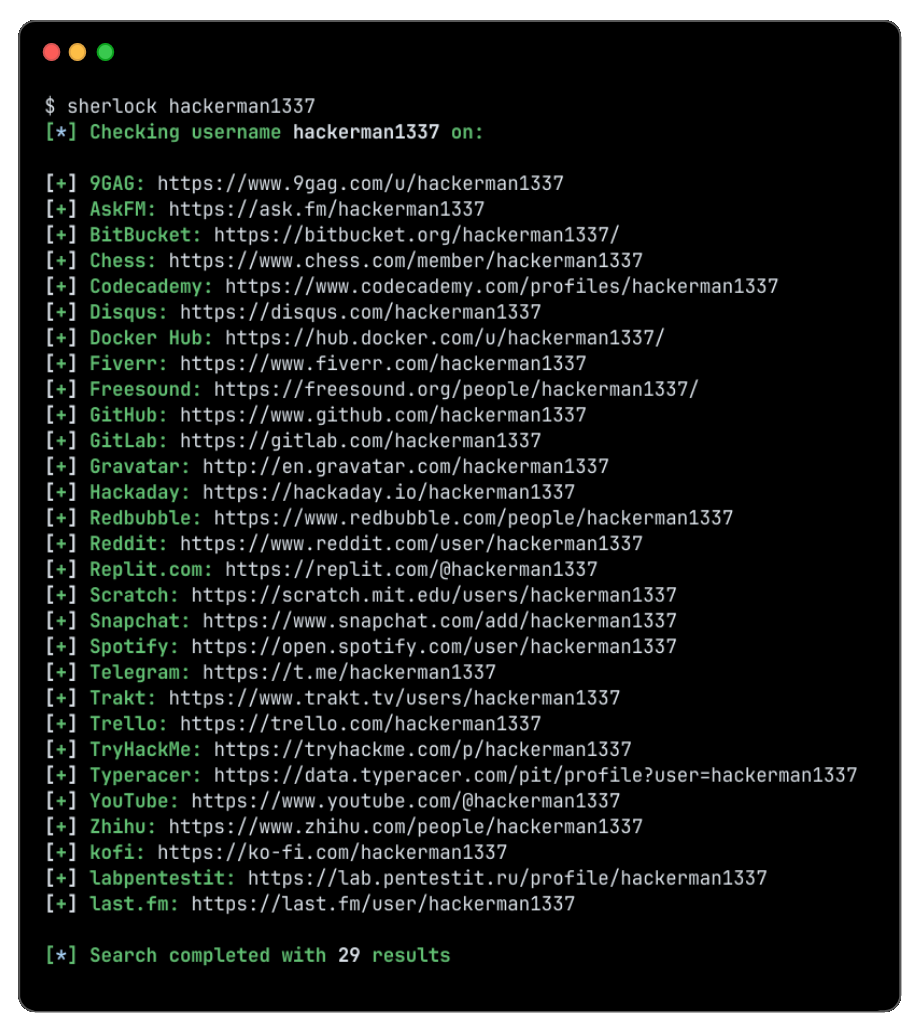
(Image from the Sherlock repository; the example username is fictional.)
The whole process has three stages:
| Stage | What it does | Output |
|---|---|---|
| Input | One or several usernames; you can use {?} to cover the three styles "underscore, hyphen, dot" together |
A list of names to check |
| Scan | Using the built-in site list, visits each site's profile address for this name and judges whether the account exists based on how the site responds | For each site, "found / not found" |
| Output | Found profile links can be saved as text, CSV, or an Excel spreadsheet | A list you can open and verify item by item |
It only checks whether public profile pages can be opened, without logging in, cracking anything, or reading private content. Because it only looks at whether a page exists, the results will include false positives: some sites return a page for any name, and some block automated access. So the list is only a lead, and every entry must be opened and confirmed.
Features are organized from the official Sherlock repository and website descriptions (current version v0.16.2, MIT license); we have not tested each item ourselves.
Why it is worth using: three reasons
- People reuse the same name across different sites. A forum account registered ten years ago, a portfolio you no longer use, a casually created test account: the names are often identical. One username can link them together, and that is exactly what you need to know in advance.
- It turns hours of manual work into minutes. Searching site by site yourself gets tiring after twenty or thirty; it can check hundreds at once and export directly to a spreadsheet.
- The list is publicly maintained. Site rules are kept in a public data file. When a website redesign breaks detection, the community updates it or removes the site from the list, rather than relying on one person's experience.
Use it step by step: a five-step SOP

The example below is "find out which accounts you or your brand have left online." Hand it to your Agent, and have it audit itself against the "completion criteria" after each step.
Sign in to unlock this key section
New accounts get 10 free credits, plus 1 more for each daily check-in. Spend 1 credit to unlock and it stays open for you.
Safety bottom lines
- Only check yourself, your own brand, or targets you have written authorization for. Using it on an ex, a colleague, or a stranger you argued with online counts as stalking and doxxing, and is illegal in many places.
- Do not make results public. Posting a person's account list online can itself harm them, even if every account is public.
- Do not conclude from a single account with the same name. Same name does not mean same person; misidentification can wrongly implicate others.
- The Agent only reads and does not act. Deleting, registering, and appealing are actions you carry out yourself.
Common pitfalls
- Treating the list as a conclusion. Some sites show a page for any name, so nonexistent accounts get mixed into the results; if you do not open and check each one, the handling list will be wrong.
- Checking only current usernames. The old names from ten years ago are often what exposes private information, so step 2 must capture old names and variants in full.
- Turning on "ignore exclusions list." The official notes say this brings more false positives, which self-audits do not need.
- Company networks or proxies causing many "cannot open" results. Some sites block automated access; switch networks and check those few again, rather than treating them as "not found."
- Not acting after the check. The value of the list lies in step 5: only deleting or setting to private the old accounts you no longer use truly reduces your exposure.
Project address: Sherlock (GitHub); official website: sherlockproject.xyz, with installation and usage instructions at Installation guide and Usage guide.
Where it usually breaks
- 01Treating the scan list as a conclusion without checking each item.
- 02Checking only current usernames and missing old names.
- 03Turning on the ignore-exclusions list, which increases false positives.
- 04Many sites failing to open because the network is blocked, and treating them as nonexistent.
- 05Not handling old accounts after the check.
Comments (0)
No comments yet. Start the conversation.