

Apple's research team has released FastFrames, a video generation model in two sizes: FastFrames-S with 1.3 billion parameters and FastFrames-L with 14 billion. Built on Wan2.1 with distillation and speedups, it generates each frame in a few dozen milliseconds, so when you press an arrow key the picture changes right away. It feels more like playing a game than waiting for a render. However, that speed was measured on data center GPUs, and the weights are licensed for non-commercial research only.
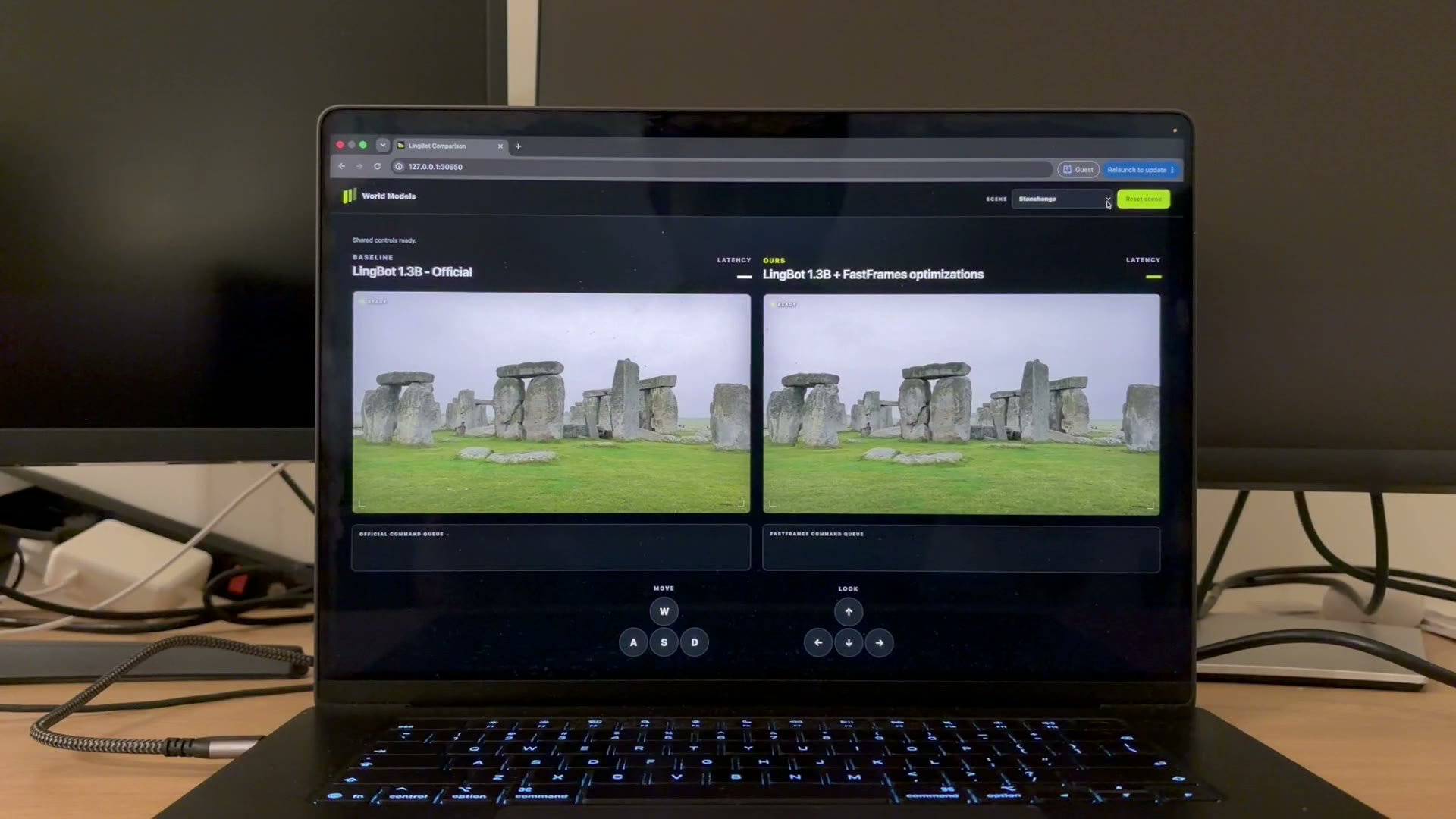
Image from the demo video on Apple's project page. Both sides receive the same key presses. The left is the original model, and the right is the version sped up with FastFrames.
What Makes It Fast
Earlier video models took a long time to generate each frame, so you could not watch and interact with the output at the same time. The Apple team broke down the time a single generation takes and found that more than half of it went to supporting steps, such as decoding the picture and updating the cache. They replaced these with lighter methods and reduced generation to two steps.
| FastFrames-S | FastFrames-L | |
|---|---|---|
| Parameters | 1.3 billion | 14 billion |
| Time per frame (official measurement) | About 36 ms on one NVIDIA B200 | About 45 ms on 8 B200s |
| Quality | On par with a similar model that is nearly 8 times slower | Noticeably more realistic than the S version |
| Output | 832×480, 81 frames, 16 fps (about 5 seconds) | Same as S |
The team also released a faster version of LingBot 1.3B, a "world model" that lets you move around a scene with the keyboard, and it runs 16 times faster than the original. The demos use WASD to move forward, back, left, and right, and the arrow keys to turn the view, with almost no pauses in the picture. Another demo uses the mouse to drag objects, and the objects move according to physical laws.
Can You Run It on Your Own Computer
Most ordinary computers can't run it. The official setup is Linux with an NVIDIA GPU and CUDA 12.8, and all the speed numbers were measured on B200s. When running the LingBot demo, peak VRAM on a single card was about 44.8 GB, which consumer GPUs cannot fit. Macs are not supported.
So "real-time local generation" means real-time on a server with data center GPUs, not on a laptop or a gaming card. If you want to try it yourself, the practical option is to rent a cloud server with a B200 or a comparable GPU.
What You Can Do With It
- Research and prototyping: experiments that need pictures generated as you interact with them, such as interactive video, game scene previews, and robot simulation.
- Understanding where things are heading: video generation is moving from "submit a job and wait several minutes" toward real-time response, and building interactive content and virtual scenes will get easier.
- Not for direct commercial use: FastFrames weights use Apple's machine learning research model license, which allows only non-commercial scientific research, and derivative models follow the same rule. The LingBot part is licensed under CC BY-NC-SA 4.0, which also bans commercial use.
Let Your AI Agent Judge Whether It's Worth Trying
Apple has open-sourced FastFrames, a real-time video generation model (apple/FastFrames-S and apple/FastFrames-L on Hugging Face, code at apple-aiml-research/ml-fastframes on GitHub). Please help me decide whether it's worth trying:

1. First, do a read-only check of my computer: the operating system, whether there is an NVIDIA GPU, the GPU model and VRAM, and the CUDA version. Compare these with the official requirements (Linux, NVIDIA, CUDA 12.8, and a peak single-card VRAM of about 45 GB in the demo) and tell me whether it can run.
2. If it can't, list the cloud GPU options I can rent (they must have enough VRAM). For each one, explain roughly how it's billed and how to shut it down so charges stop when I'm done.
3. Read through the model's license and tell me in plain language what I can and cannot do with it. I plan to use it for: [your purpose, e.g. learning and research / building a product].
4. Don't install anything, don't download the weights, and don't activate or pay for any service. Just give me your conclusion and a plan, and wait for my confirmation.
Things to Watch Out For
- The 14B version needs a whole 8-GPU machine: the official speed numbers were achieved with 8 B200s running together. A single card cannot reach that speed.
- The resolution is low: it currently outputs 480p, which is good for interaction and previews, but still far from producing finished videos.
- The code and the weights have different licenses: the code uses Apple's sample code license, and the weights are for research only. Read both before you use them.
Comments (0)
No comments yet. Start the conversation.