


Tool calling means: you tell the model which functions are available, the model picks one and gives its arguments, your code runs that function, and the result goes back to the model.
Keep these points in mind
- A tool can be a simple function or a third-party API.
- The model does not execute anything itself. It only says 'I want to call this function with these arguments'.
- You need three things: a model that supports function calling, a description of each function (schema), and the real code for each function.
- Handle errors, validate arguments, and keep track of state.
Going deeper
The flow. Take 'look up what time it is now in a city' as an example:
- Send the function description to the model: its name, its purpose, and what parameters it needs.
- The user asks 'what time is it in Tokyo now', and the model replies 'call get_time, with city=Tokyo'.
- Your code actually runs the function and gets the result.
- Send the result back to the model, which then answers you in plain language.
Where it applies. Looking up current data (weather, stock prices, databases); running code for calculations and reports; automated workflows (sending emails, scheduling calendars); customer service looking up tickets; content checks (grammar, summaries, safety).
Don't overlook these. Decide what happens when a tool fails, and have error handling. The model may pass wrong arguments, so validate them first. In multi-turn conversations, remember what was called earlier. And keep tool permissions as narrow as possible, so it cannot do more than it needs.
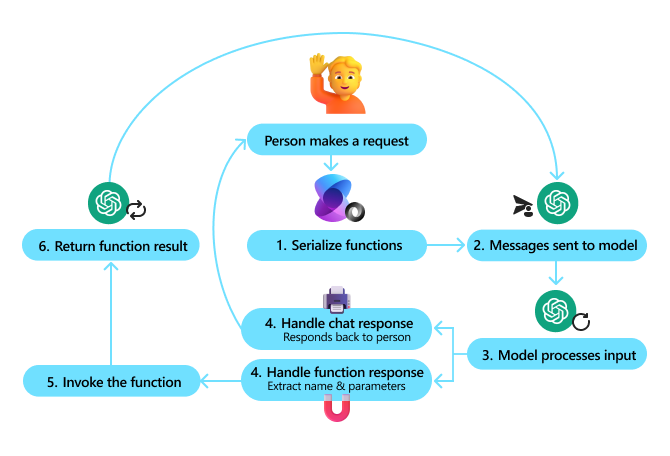
Image from the course repository.
Try it yourself
Write a minimal function, for example one that returns the current time. Then write a description telling the model its name, purpose and parameters, and try it with any model that supports function calling to see whether it picks the right one.
Let your agent teach you
Paste the text below into your agent (Claude Code, ChatGPT and Gemini all work), and it will guide you step by step like a mentor.
Sign in to unlock this key section
New accounts get 10 free credits, plus 1 more for each daily check-in. Spend 1 credit to unlock and it stays open for you.
References
- Content adapted from microsoft/ai-agents-for-beginners, lesson 4 (
04-tool-use). The original project is under the MIT license. - For the original and full code: 04-tool-use
- For all courses, see the Agent course roadmap
Comments (0)
No comments yet. Start the conversation.