

What you get
You're using someone else's software and come across a feature that feels great. You want something like it in your own product, but you have no idea how they built it. That's what REA, an open-source reverse-engineering tool, is for. Once your AI agent has it installed, it can take that feature apart without the other company's source code, explain how it works and where the evidence for each part comes from, and then write your own version in your project based on the principle. Three copy-paste prompts are below.
Let's be clear about the boundaries first: taking it apart is to understand how it works, and what you write is your own code. Nobody else's code, images, APIs, or data gets copied. That rule is built into every prompt below.

Here's how it works: first, your AI agent installs REA. You name the app and the feature, and it uses REA to investigate and returns an explanation backed by evidence. Once you understand the principle, it writes its own version from scratch in your project and runs tests to confirm it works.
What it can take apart
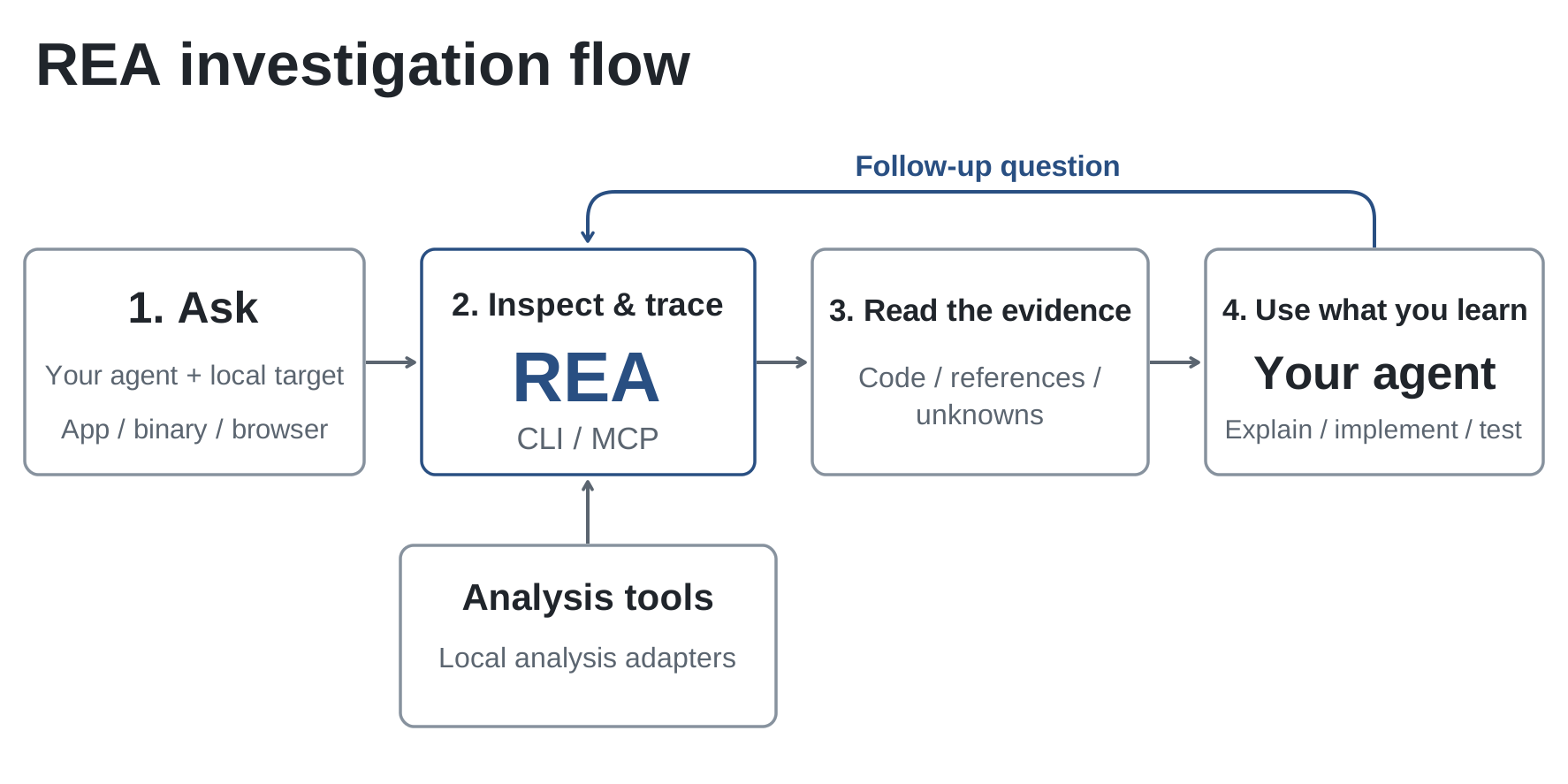
The image comes from REA's GitHub repo. According to the project's own docs, it can take apart roughly these kinds of things:
What you want to take apartExamplesWhat else to installWeb pages and sitesHow a site's search or filters workA Chrome-based browserDesktop apps (including Electron)A note app's clipboard handling or keyboard shortcutsOnly Node.js for static analysisAndroid appsAn app's screen flow or data structuresJADX and a full Java environmentNative programs and old gamesHow a calculation or piece of logic worksOne of Hopper, Ghidra, or IDA
The recent 6.9 release also recognizes more formats, including Unity and Godot game asset bundles, WeChat mini-program packages, single-file programs packaged by .NET, Bun, and Deno, and various firmware images. The release notes also say results now take up less context when returned to your AI agent, and long analyses are more stable.
The project's showcase includes a couple of examples. One follows the clipboard feature in the Notion desktop app all the way to how its main process handles rich text. In another, the stereo left-and-right audio math from an old game was rebuilt as C code, and its output matched the original program exactly, value by value.
Step 1: Have your AI agent install REA
REA needs a fairly recent version of Node.js and npm on your computer. Let your AI agent handle the install and setup. Copy this:
Help me install REA, an open-source reverse-engineering tool, so I can take apart a feature in another app and learn how it works.
Only install from official sources: the GitHub repo https://github.com/morluto/rea , or the rea-agents package on npm.
1. Read the README first and check whether the Node.js version on my computer is high enough. If it's not, tell me before doing anything else.
2. Set REA up for yourself with the official setup command. Setup will list its plan first. Read the plan out to me, and only run it after I agree.
3. The thing I want to take apart is [website / desktop app / Android app / native program]. Tell me which extra tools I need to install for that, and ask me before installing them.
4. After installing, run a self-check and tell me whether you need to restart.
Why it's written this way: REA's repo specifically warns that similarly named repos and copied instructions aren't official, so the first line pins down the install source. Different targets need very different tools, and step 3 has your AI agent install only what the target needs.
Step 2: Say exactly which feature to take apart
Once it's installed, put the app on your machine (for a website, give the URL) and send this. The more specific you are, the better. "Why is its search so fast?" is far more useful than "take this app apart":
Sign in to unlock this key section
New accounts get 10 free credits, plus 1 more for each daily check-in. Spend 1 credit to unlock and it stays open for you.
Why it's written this way: every finding REA returns comes with evidence, and item 3 makes your AI agent separate what's confirmed from what's guessed, so you know which parts you can safely build from. Item 5 asks for the principle and several approaches, not code. The code you write in the next step is your own.
Step 3: Build your own version from the principle
Once you've read the explanation, switch to your own project folder and send this:
Based on the explanation you just wrote, build a similar feature in my project: [one sentence describing the effect you want].
1. Write it from scratch. Don't copy any of their code, copy, images, or APIs.
2. First tell me which implementation you plan to use and why, and wait for my approval before writing anything.
3. After writing it, add tests. Once they pass, tell me which files you changed and how I can try it.
4. Add one improvement to my product: [what you think they got wrong and how you'd do it better].
Why it's written this way: their implementation is only a reference. Item 4 pushes you to add one improvement of your own, so what you ship is your product, not a clone.
Things to keep in mind
-
Read the terms of service and local law first. Many apps' terms prohibit reverse engineering, and some regions restrict it too. Only take apart software you obtained legally, and if you're not sure, don't.
-
Don't touch paywalls or copy protection. Don't use it to crack licenses, bypass payments, or remove protections.
-
Learn the principle, don't copy the stuff. Copying code, UI, copy, or assets is infringement. Write it yourself from scratch.
-
Big-company apps are hard to take apart. Software with huge codebases or heavy obfuscation will mostly come back as "unknown". Start with small, simple tools to practice.
For how to use REA to take apart niche apps and find product ideas, read this experience post: Stuck for a niche product idea? Have your AI agent take a few existing apps apart with REA. The skill page is REA traces an app's behavior all the way down to the binary.
Comments (0)
No comments yet. Start the conversation.