


What you'll get
Using the free, open-source givemotion, Claude Code or Codex can make a product promo video, an animated data chart, or a vertical short video for you. You end up with an MP4 file. You don't need editing or coding skills. This article includes 4 prompts you can copy and paste.
It makes motion graphics and text-based visuals. It can't film real people or real scenery. If you want a dog running on a beach, you'll need a video generation model. If you want a video where every title, number, and logo is exactly right, givemotion is the better choice.

Why editing is easier than with a video model
A video generation model paints each frame. If you say "make the title a different color," it often regenerates the whole video. Other parts can change too, and the text can end up misspelled.
givemotion takes a different approach. The agent builds the video the way it would build a web page. Text, logos, and charts are real elements. Then givemotion records it frame by frame. This has three benefits:
- Only the part you change moves: If you say "make the title blue," only the title changes. Everything else stays as you approved it. Only the one or two seconds affected get re-rendered.
- Text and logos stay exact: Text is set as real type, not painted by a model. What you write is what appears.
- One video can be reused: Swap a name, a number, or a language to make another version.
Here is how the two tools compare:
| What you want | Video generation model | givemotion |
|---|---|---|
| Live-action footage like people, animals, or landscapes | Good fit | Can't do it |
| Product promo videos and feature demos | Text often gets garbled | Good fit |
| Animated data charts | Numbers aren't guaranteed to be right | Good fit, drawn from the numbers you give |
| Vertical short videos with word-by-word captions | Captions have to be added separately | Good fit |
| Small edits and multiple versions | Each change regenerates the video, and you pay for it | Renders on your own computer, no per-video fee |
You can also combine them. Generate a live-action-style clip with a video model first. Then have the agent place it into a givemotion video and add titles and captions.
Step 1: Have the agent check your computer and set it up
givemotion runs on your own computer. It needs Node.js (the runtime that runs it) and ffmpeg (the tool that stitches frames into video). You don't have to install these yourself. Send this message to Claude Code or Codex:
I want to make animated videos with the open-source project givemotion (https://github.com/givemotion/givemotion). Please help me get the environment ready:
1. First, check whether my computer has Node.js 20 or higher and ffmpeg. Tell me the results in plain language.
2. For anything missing, tell me what to install and roughly how big it is. Wait for my OK before installing.
3. Create a video project named [my-video] in the current folder, and set up the instruction file for you to use.
4. Finally, run the environment check that comes with it, and tell me whether everything is ready.
We ask before installing anything so your computer isn't changed without you knowing. The final environment check catches setups that installed but still don't work.
Step 2: Describe the video in one paragraph
This is the most important step in the whole article. The more specific your description, the less the agent has to guess, and the closer the first version will be to what you want. Here is a general template. Replace the bracketed parts with your own content:
Sign in to unlock this key section
New accounts get 10 free credits, plus 1 more for each daily check-in. Spend 1 credit to unlock and it stays open for you.
Here's why the template is written this way:
- Copy text exactly: This is where givemotion beats video models. Tell the agent clearly not to "polish" your titles and numbers.
- Check the overview before rendering: One image shows what each section looks like. That's much faster than waiting for the full video to render and then finding problems.
- Give the main color as a hex code: "Blue" could mean a hundred different blues. A hex code is the simplest way to be exact.
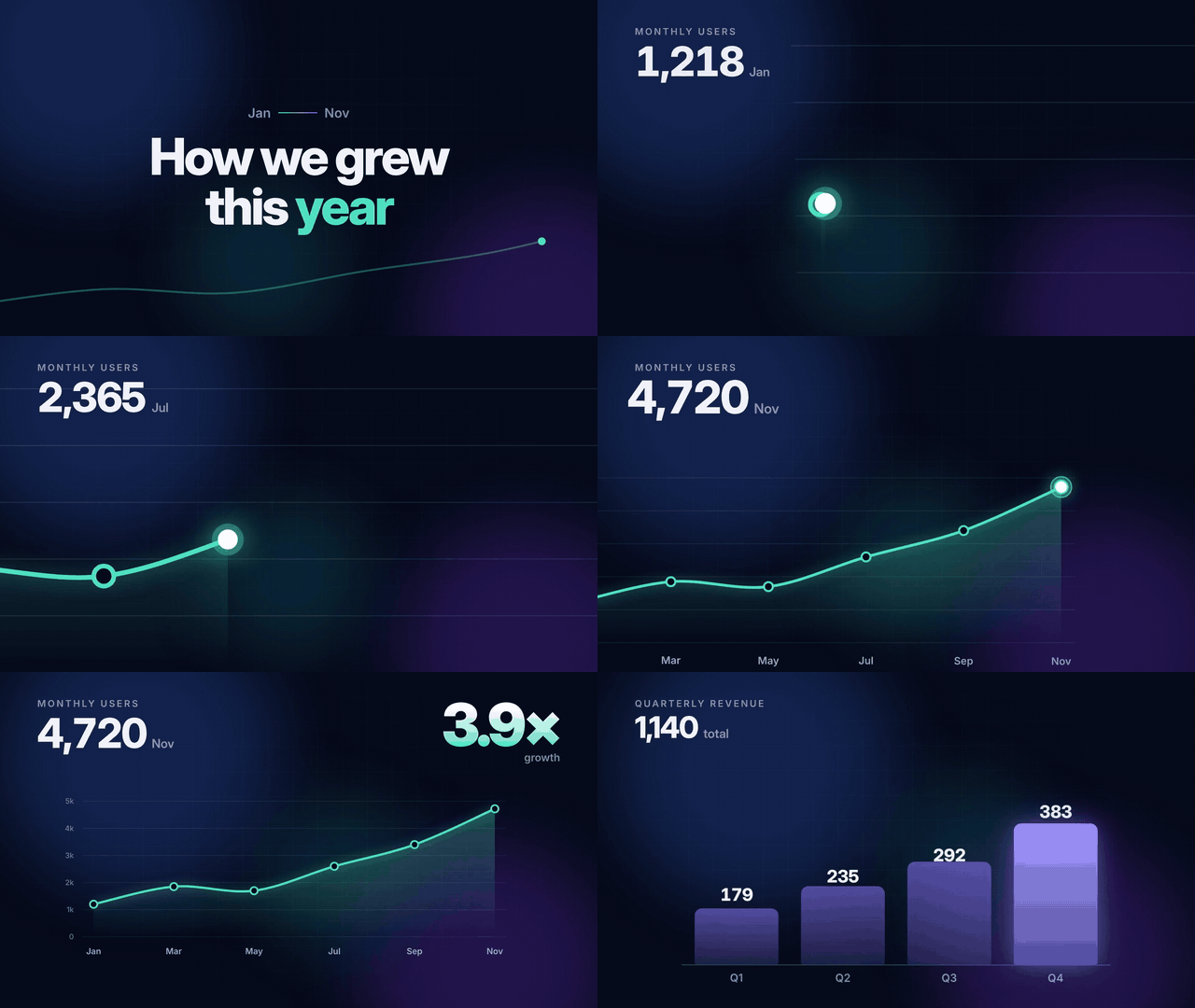
Below is a data chart video the project's author made from a single description with Claude. The camera follows the line as it rises:
Step 3: Ask for changes in plain words
Once the video is ready, just say in plain language what to change, such as:
- "Make the title blue"
- "Hold the chart section for two more seconds"
- "Make the URL at the end a bit bigger"
You can list several changes at once, but each one should name the section and what to change. You can send something like this:
I've watched the video. Please change only these spots and keep everything else the same:
1. [Opening title] change to [blue]
2. [Chart section] hold for [2] seconds longer
3. [Ending URL] make the text a bit bigger
After the changes, render again and tell me which sections were regenerated.
Including "keep everything else the same" matters because the agent sometimes "improves" other parts on its own. When you set the scope clearly, the parts you already like stay untouched.
Step 4: Make several versions from one video
You might need an English and a Spanish version of the same video, or the same video with different client names and numbers. You don't have to start over:
Keep the design and pacing of this video. Use givemotion's data replacement to make [2] more versions:
1. Version A: [translate all titles and captions into Spanish]
2. Version B: [change the client name to ……, and the numbers to ……]
Save each version as its own MP4. Don't overwrite the original source files.
Vertical short videos can be batch-made this way too. The example in the author's repo has captions that pop in word by word:

What it can't do yet
- Can't generate live footage: People, animals, and landscapes have to come from a video model and be added in afterward.
- No voiceover or automatic captions: You need to prepare the audio yourself. Word-by-word captions need a subtitle file with timing.
- No visual editor: The built-in preview page only lets you watch and scrub through the timeline. All edits happen by talking to the agent.
- Complex 3D scenes render slowly on computers without a dedicated graphics card.
Notes
- The project was released at the end of October. The current version is 0.1.5, so it's still new. If you hit a problem, check GitHub Issues to see whether someone has already reported it.
- The README compares givemotion with Remotion and HyperFrames using scores. The author ran those tests with AI judges, and the sample is small, so treat the scores as a rough guide.
- The more detailed the work, the more usage the agent burns. In the author's tests, the same 20-second clip cost about $1 at the lowest effort level and over $14 at the highest. For everyday use, the medium setting gives the best value.
- You need a paid Claude Code or Codex account. givemotion itself is free. It renders on your own computer, with no per-video fee.
References
- GitHub: givemotion/givemotion (MIT license)
- Website and demo videos: givemotion.org
To learn what instruction file the agent uses, read Skill. For a ready-made template you can edit to make motion graphics, see Pick a template, change the words, and let AI make the motion graphics.
Comments (0)
No comments yet. Start the conversation.