

Google released Gemini 4 Neon on November 18, and it sits between Hydrogen and Carbon. It's smarter than the everyday Hydrogen and gets close to the top-tier Carbon, yet it runs the same tasks faster and for less money. The API name is gemini-4-neon. It's paid-only, with no free quota: input runs $3 and output $15 for each million tokens. Going by Google's own numbers, it scores 61 on the Artificial Analysis intelligence leaderboard, good for third place.
How It Fits Between Hydrogen and Carbon
| Model | Google's positioning | Good for |
|---|---|---|
| Gemini 4 Carbon | The strongest reasoning model | The hardest architecture work, debugging, research, and security questions |
| Gemini 4 Neon | A balance of depth and efficiency | Complex work you do every day: multi-file code changes, reports from long documents, science and data analysis |
| Gemini 4 Hydrogen | Fast and cheap everyday model | Routine coding and AI agent tasks |
| Gemini 3.5 Flash-Lite | Fastest and cheapest | High-volume simple requests |
The model menu in the Gemini app has been reshuffled to match. "Everyday help" uses Hydrogen, "Deeper analysis" uses Neon, and "Coding and complex work" uses Carbon. Neon takes the slot that Argon used to hold.
Benchmarks
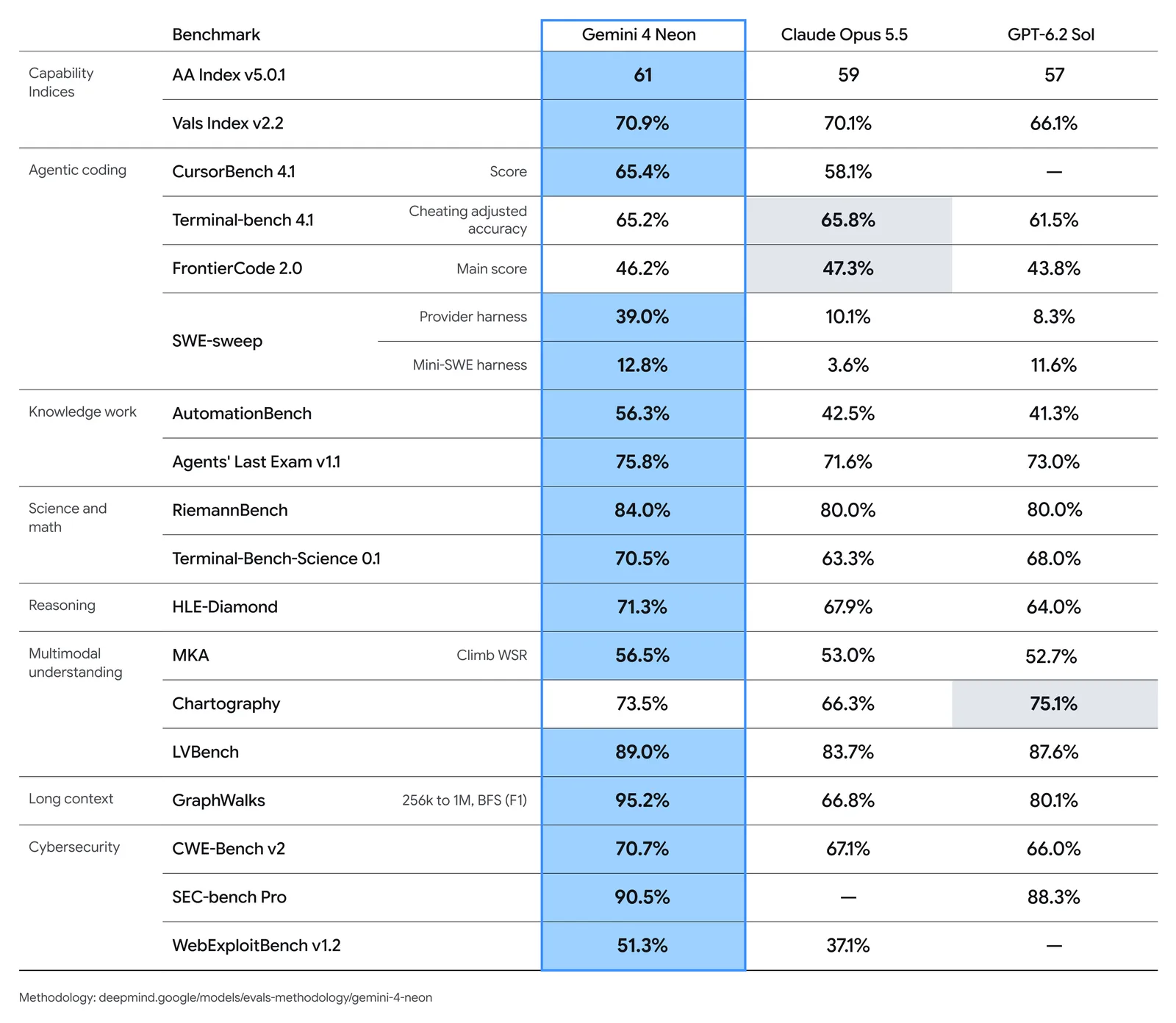
The image comes from Google's official blog and compares Neon with Claude Opus 5.5 and GPT-6.2 Sol. A few results stand out:
- Overall index: Artificial Analysis gives Neon 61 at its highest thinking level. Claude Opus 5.5 gets 59, and GPT-6.2 Sol gets 57.
- Agent-style tasks: Neon scores 56.3% on Zapier's AutomationBench, more than ten points ahead of the other two. It reaches 75.8% on Agents' Last Exam.
- Long context: 95.2% on GraphWalks (256K to 1M tokens), where Claude Opus 5.5 scores 66.8%.
- No clean sweep: Claude Opus 5.5 edges ahead on two coding benchmarks, Terminal-Bench 4.1 and FrontierCode 2.0. GPT-6.2 Sol leads on chart understanding (Chartography).
- All of these are Google's own figures. The methodology is described in DeepMind's evaluation notes, and independent re-tests will take a while.
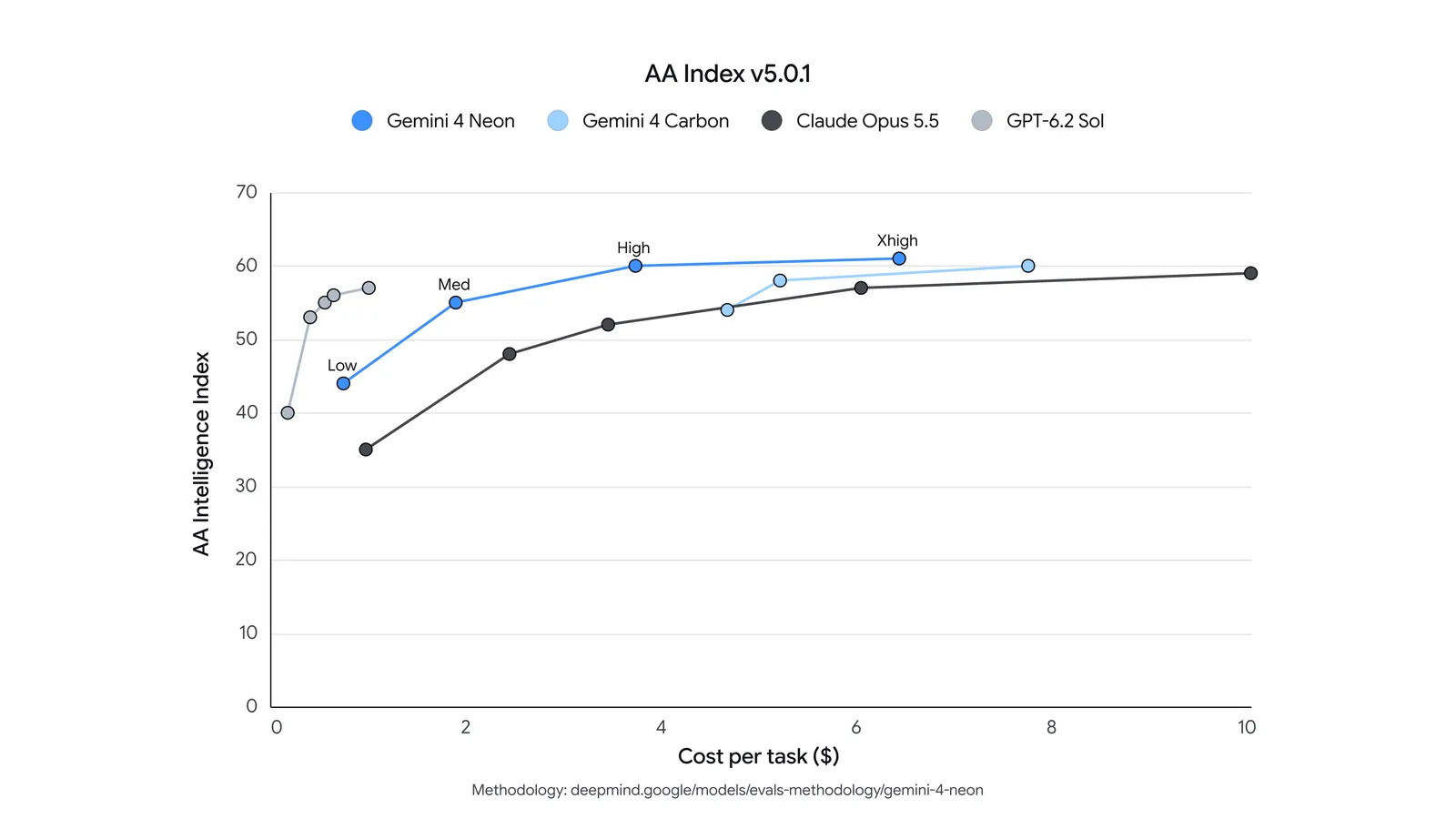
This chart shows the real selling point best. The horizontal axis is what a task costs, and the vertical axis is the score. At the default "high" setting, Neon already reaches 60 for less than $4 per task. Carbon and Claude Opus 5.5 spend more to reach a similar score. Google says that at the default setting, each task costs 32% less than on Carbon.
Pricing
| Usage | Per million input | Per million output |
|---|---|---|
| Free tier | Not offered | Not offered |
| Standard paid | $3 | $15 (includes thinking tokens) |
| Batch / flex | $1.50 | $7.50 |
| Priority | $5.40 | $27 |
The price is the same across the whole 1M-token context window, with no separate rate for long prompts. Cached input is 95% cheaper, at $0.15 per million tokens. Neon costs twice as much as Hydrogen. Carbon and Argon are on a promotional rate of $2 input and $10 output per million tokens until the end of November. From December 1, they rise to $4 and $20, and at that point Neon is about a quarter cheaper.
Where You Can Use It
- Gemini app: Open to anyone on an AI Pro or Ultra plan. Pick "Deeper analysis" in the model menu.
- Google AI Studio and the Gemini API: Paid tier only. Pro and Ultra subscribers can also try it in AI Studio.
- Google Antigravity: Available to paying AI Pro and Ultra users. Neon can act as a team lead, directing several Hydrogen sub-agents that work in parallel.
- Gemini for business and Android Studio have it too.
The official announcement doesn't mention Gemini CLI or Vertex AI.
Switching From Other Gemini Models
Moving from another Gemini 4 model is the easy part. The request format stays the same, and you only change the model name. Watch two things. Neon defaults to the "high" thinking level and adds an extra xhigh level (Carbon and Argon default to "medium" and top out at "high"). And your project has to be on a paid plan.
If you're coming from Gemini 3.8 Flash or an older model, these items on the official checklist are the easiest to miss:
- The
minimalthinking level is no longer supported, and sending it returns an error. - Remove
temperature,top_p, andtop_k. - Manual caching with
cachedContentsno longer works. Use automatic caching instead, which only kicks in for prompts over 4,096 tokens. - Synchronous output is capped at 65,536 tokens. If you hard-coded lower limits like 8,192, you can raise them. For longer outputs, use background mode.
- Hard problems can take several minutes, so set your client timeout to at least 15 minutes.
If you'd rather not make these changes yourself, give this prompt to your AI agent:
Help me evaluate whether to switch the Gemini models in this project to gemini-4-neon.
1. First list every place in this project that calls Gemini, the model name each one uses now, and its thinking level. Wait for my confirmation before changing anything.
2. Confirm that my API project is on a paid plan, since Neon has no free tier. If it isn't, stop and tell me.
3. Follow the official migration checklist: remove temperature, top_p, and top_k; change the minimal thinking level to low; remove manual caching; raise any hard-coded output limits; and set the request timeout to 15 minutes.
4. Pick the three most-used calls, run each one on the original model and on gemini-4-neon at the high thinking level, then give me a table comparing the results, the latency, and the token usage.
5. Don't touch API keys or billing settings.
FAQ
Is Gemini 4 Neon free? No. The Gemini API only offers a paid tier, and in the Gemini app you need an AI Pro or Ultra plan.
Should I pick Neon or Carbon? Try Neon first for most complex work. Its results are close, and it's faster and cheaper. Save Carbon for the hardest long-chain reasoning, architecture, and security problems.
Should I pick Neon or Hydrogen? For everyday coding and AI agent tasks, Hydrogen is enough and costs half as much. Switch to Neon for jobs that touch many files or require reading a lot of material before making a call.
What's the API name and context length?
The model name is gemini-4-neon. Input, thinking, and output share a 1M-token context window, and a single synchronous response can run up to 65,536 tokens.
Can I use it in Gemini CLI? The official announcement doesn't mention Gemini CLI. The confirmed entry points are the Gemini app, AI Studio, the Gemini API, Antigravity, Gemini for business, and Android Studio.
References
- Google blog: Introducing Gemini 4 Neon
- AI Studio docs: What's new in Gemini 4 Neon and the migration guide
- Gemini API pricing
- For the everyday sibling model, see Google Gemini 4 Hydrogen is out
Comments (0)
No comments yet. Start the conversation.