

Ant Group's inclusionAI team has open-sourced Ming-3.0-audio-flash under the MIT license, so you can use it commercially for free. It listens to audio directly instead of converting speech to text first. It can transcribe speech, answer questions about what it hears, analyze what happened in a recording, and read its answers aloud with a built-in voice or with a reference voice you provide. It also took first place on the Artificial Analysis speech reasoning leaderboard with 99.8%, finishing above xAI's, Google's and OpenAI's latest voice models.
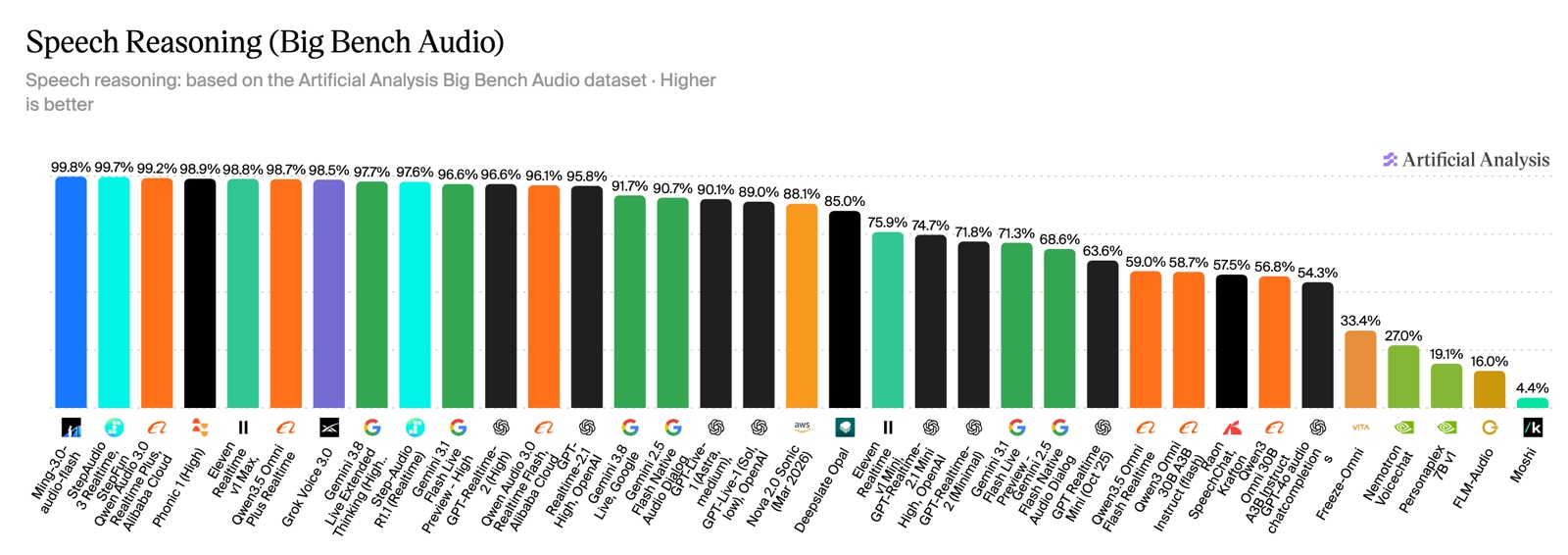
The image comes from the model's Hugging Face page. The leaderboard measures how well a model can hear a spoken question and then reason its way to an answer.
How to read the top spot
Ming-3.0-audio-flash is at the top, but the leading models are packed tightly. StepFun's StepAudio 3 Realtime scores 99.7%, Alibaba's Qwen Audio 3.0 Realtime Plus scores 99.2%, and the top seven all score above 98.5%. In other words, on listening to speech and reasoning about it, the best models are already close to perfect, and the gaps are only a few tenths of a percentage point. What stands out is that an open-source model you can download, deploy yourself, and use commercially has reached this level.
The model page also includes tables of scores for speech recognition, audio understanding, and text tasks. Scores marked with an asterisk were measured by the team itself, so keep that in mind when you compare them.
Two versions
| Ming-3.0-audio-flash | Ming-3.0-audio-tiny | |
|---|---|---|
| Total parameters | 126 billion | 9.3 billion |
| Active per request | 6.5 billion | 2.7 billion |
| Official deployment reference | 4 GPUs with 80 GB each (H800, 128K context). Long audio may need 8. The SGLang-Omni setup uses 2. | 1 GPU for text output or speech recognition. 2 GPUs for spoken replies. |
| License | MIT | MIT |
Both models use a mixture-of-experts design. Their total parameter count is large, but each request uses only a small part of them, so they run faster than ordinary models of the same size. The Flash version still has to load all of its parameters into GPU memory (VRAM), so an ordinary computer cannot run it. If you want to try it yourself, the Tiny version or a rented cloud GPU is the more realistic choice.
What it can do
- Complex speech recognition: It transcribes Chinese and English, dialects, accents, noisy environments, and multiple speakers.
- Long audio understanding: You can ask questions about a full meeting or podcast recording, such as "What were the main topics?"
- More than voices: It can recognize ambient sounds, music, and other audio scenes.
- Spoken answers: It can reply with text only, read its answer aloud with a built-in voice, or imitate a voice from a reference recording.
Once deployed, it provides an API that follows the OpenAI format for transcription, speech synthesis, and chat. Tools and AI agents that already support the OpenAI format can connect by changing the endpoint address.
Let your AI agent help you decide whether to try it
Ant Group open-sourced the speech model Ming-3.0-audio-flash (Hugging Face: inclusionAI/Ming-3.0-audio-flash, and the smaller inclusionAI/Ming-3.0-audio-tiny), under the MIT license. Please help me decide whether it is worth using:

1. I want to use it for: [for example, turning meeting recordings into text and then writing minutes / adding voice Q&A to my app / transcribing dialect recordings].
2. Do a read-only check of my computer's GPU and VRAM, compare them with the deployment requirements on the two model pages, and tell me which model I can run. If I can't run either one, tell me which cloud GPU spec would fit and roughly how it is billed.
3. Compare it with what I use now: [for example, Whisper / a certain cloud speech API], and list the pros and cons of each.
4. Its loading code needs trust_remote_code. Read through the code in the repository first, and tell me if anything looks suspicious.
5. Do not download the model, do not install anything, and do not sign up for any paid service. Give me your conclusion first and wait for my confirmation.
Things to watch out for
- High VRAM requirement: The official reference setup for the Flash version is 4 GPUs with 80 GB each. The Tiny version needs at least one GPU too.
- It runs code from the repository: Loading the model requires enabling
trust_remote_code. The official docs also advise reviewing the code before you turn it on. - Be careful with voice cloning: Get the person's consent before you use a reference recording to imitate their voice, and never use it to impersonate someone else.
- One benchmark is only one view: A high speech reasoning score does not guarantee good results for your situation, such as a particular dialect or technical terms. Test it on your own recordings before you decide.
Comments (0)
No comments yet. Start the conversation.