

The team behind OpenDesign has open-sourced OpenMotion, a workbench that treats video as code. It positions itself as an open-source alternative to Claude Motion and CapCut. Here is how it works. Give it a video you like, either by uploading a file or pasting a social media link. Your AI agent breaks down the shot order, transitions, and pacing. Then it swaps in your brand, copy, and assets, rebuilds the video in HTML, and lets you adjust timing and export an MP4 in its built-in editor. The project uses the Apache-2.0 license. The software itself is free, with no subscription and no per-render fees. At the time of writing, it has about 10,000 stars on GitHub.
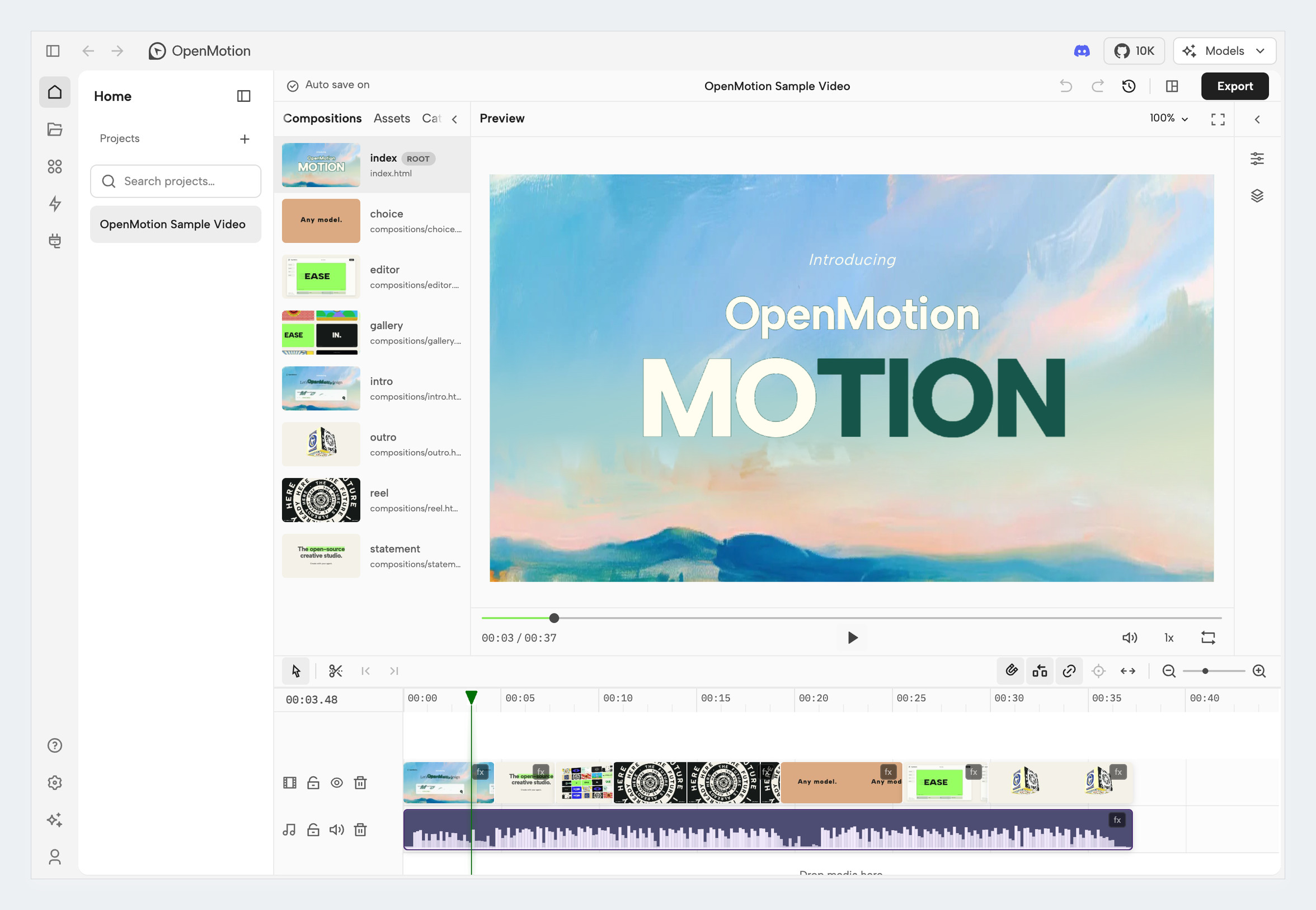
Image from OpenMotion's GitHub repository.
How It Differs From Regular Editors
CapCut-style editors make you drag in clips and add effects yourself. OpenMotion hands that work to your AI agent. Every frame is a piece of web code. The agent edits the code, you check the result in the editor, and if you don't like it, you tell the agent what to change in plain language. Changes stay in the same project, so you can pick up where you left off at any time.
| What it does | What that means |
|---|---|
| Remake a reference video | The agent breaks down the reference shot by shot, rebuilds it with your brand, and shows the original and the new version side by side at the same moment |
| Start from a template | The official template library is sorted by brand, purpose, and video type, from product launches and brand films to talking-head packaging. It has several hundred references. |
| MOTION.md motion spec | A Markdown file that describes how a video is split into shots, how long each one runs, how transitions work, and which assets can be swapped. Your agent can read it directly, and you can share it so others can reuse it. |
| Generate missing assets | Add your own model API key, and missing images and videos can be generated right inside the project. Music and voiceover work too. The cost goes to your model account. |
| Manual polishing | The built-in editor lets you import assets, arrange the timeline, and edit subtitles by hand. Preview before you export. |
This is most useful for two groups: small teams that want a solid promo video for their product but don't know how to edit, and people already making videos with HyperFrames. It can import a HyperFrames project archive and let you keep editing from there.
How to Install
OpenMotion works with more than 20 agents, including Codex, Claude Code, DeepSeek Harness, and WorkBuddy. It connects through MCP and Skills. The easiest route is to hand the prompt below to your AI agent. The install steps come from the official repository.
Help me install OpenMotion (an open-source AI video motion workbench, repo github.com/nexu-io/openmotion).

1. First read https://github.com/nexu-io/openmotion/blob/main/install.md and follow its steps to install and connect it in my current agent.
2. Before installing, check whether my computer already has Git, Node.js, Chrome, and FFmpeg. If any are missing, tell me what to install and why, and wait for my approval before installing anything.
3. Once it's installed, open the template library and explain in plain language how to pick a template and how to swap in my own brand.
4. When it's time to enter a model API key, stop and let me enter it myself in the settings screen. Don't ask me to paste the key into the chat.
ChatGPT users can also install it in one click from ChatGPT's plugin directory.
What It Costs
- The software is free. It's open-source software that runs locally. The project charges no subscription fee and no rendering fee.
- Your AI agent costs stay the same. You pay through your existing agent subscription or API quota. Building one video takes a lot of code reading and writing, so it can use up a fair amount of quota.
- Generated assets are pay-as-you-go. Image, video, music, and voiceover generation runs through your own model account, and you pay for what you use. If you only use your own screen recordings, images, and music, you won't pay for this part.
Things to Keep in Mind
- Learn from the motion, don't copy the assets. Most reference clips in the template library come from big companies and well-known creators. Learning from their pacing is fine, but don't drop their footage or logos into your own video. The same goes for people and music. Replace all of it before commercial use.
- The requirements are fairly new. The official requirements call for Node.js 26.11.1, plus Chrome and FFmpeg. On an older computer, have your agent check everything before installing.
- The repository is large. Full reference videos use Git LFS and aren't downloaded by default. Pull them only when you need them instead of cloning everything up front.
- The project has just launched officially. The maintainer team is small. If you run into a problem, open an issue on GitHub.
If you want to understand the idea of breaking a video down and rebuilding it first, read the tutorial Break Down a Video, Then Rebuild It With HyperFrames. For commercially usable transitions and character assets, see Ready-Made Animations and Characters for AI Agent Videos.
OpenMotion GitHub repository · Official site · Template library
Comments (0)
No comments yet. Start the conversation.