

The iLang team built an open-source toolkit for DeepSeek Harness (DSH), DeepSeek's AI agent desktop app. It packs the whole process of starting a content channel from zero into one phrase. Say one fixed trigger phrase (in Chinese) to your AI agent, and it walks you through building a source library, writing articles into your WeChat Official Account drafts folder, signing up for X, and connecting a Grok Bot that posts on a schedule.
According to the authors, you only handle payments, QR-code scans, logins, and sign-offs. Your AI agent does everything else. Close the window and nothing is lost. Say the same phrase again, and it picks up where it stopped. What keeps beginners going is that it saves the progress of every step on your own computer. You can stop at any time and pick up again later.
The Workflow at a Glance
| Stage | What the agent does | What you do |
|---|---|---|
| Set up | Checks which software your computer is missing, asks before installing each one from its official source, then installs the toolkit and plugins | Download DSH, add a little model credit, pick a mode, and paste the install command |
| Build a source library | Turns your notes and course materials into local Markdown files, sorted by topic, with sources kept | Tell it where your materials are and which direction you want to take |
| Write | Writes articles in the style you choose, adds images, formats them, and moves them into your WeChat Official Account drafts folder | Review on your phone, and publish yourself once you're happy with it |
| Open an X account | Walks you through signing up and getting a premium membership, step by step | Do the sign-up and payment yourself |
| Connect a bot | Helps you install Grok Bot, enable X's official API, and hand the written playbook to the bot | Scan the QR code to log in, then click authorize |
| Daily bot upkeep | Posts short posts on a schedule, and drafts replies and long posts for your review | Review the drafts and approve them before they go out |
The authors are also working on two things. One turns any money-making guide into a step-by-step playbook that an AI agent can follow (they call it an "engineering book"). The other syncs one article to several platforms, and even cuts it into a video for upload.
These are the authors' public claims. The toolkit was released recently and has few stars on GitHub. We have not installed or tested it, so we have not verified the results.
Why It Works: Three Reasons
- Pick up where you left off, so beginners stick with it: The most common way a content project dies is that by day three you've forgotten where you were. Progress, habits, and decisions are saved to local files. Next time, one sentence is enough to resume, and you don't have to explain everything again.
- You guard the checkpoints: You handle payments, QR scans, logins, and publishing. Your AI agent handles the rest, including organizing, writing, and setup. The split is clear, so technical details don't scare beginners off, and the agent never oversteps.
- Guides become playbooks the agent can run: Most tutorials stop at "I get it." Rewrite a guide as step-by-step instructions with checkpoints, and your AI agent can carry them out while you only check the results.
Build It: A Five-Step SOP
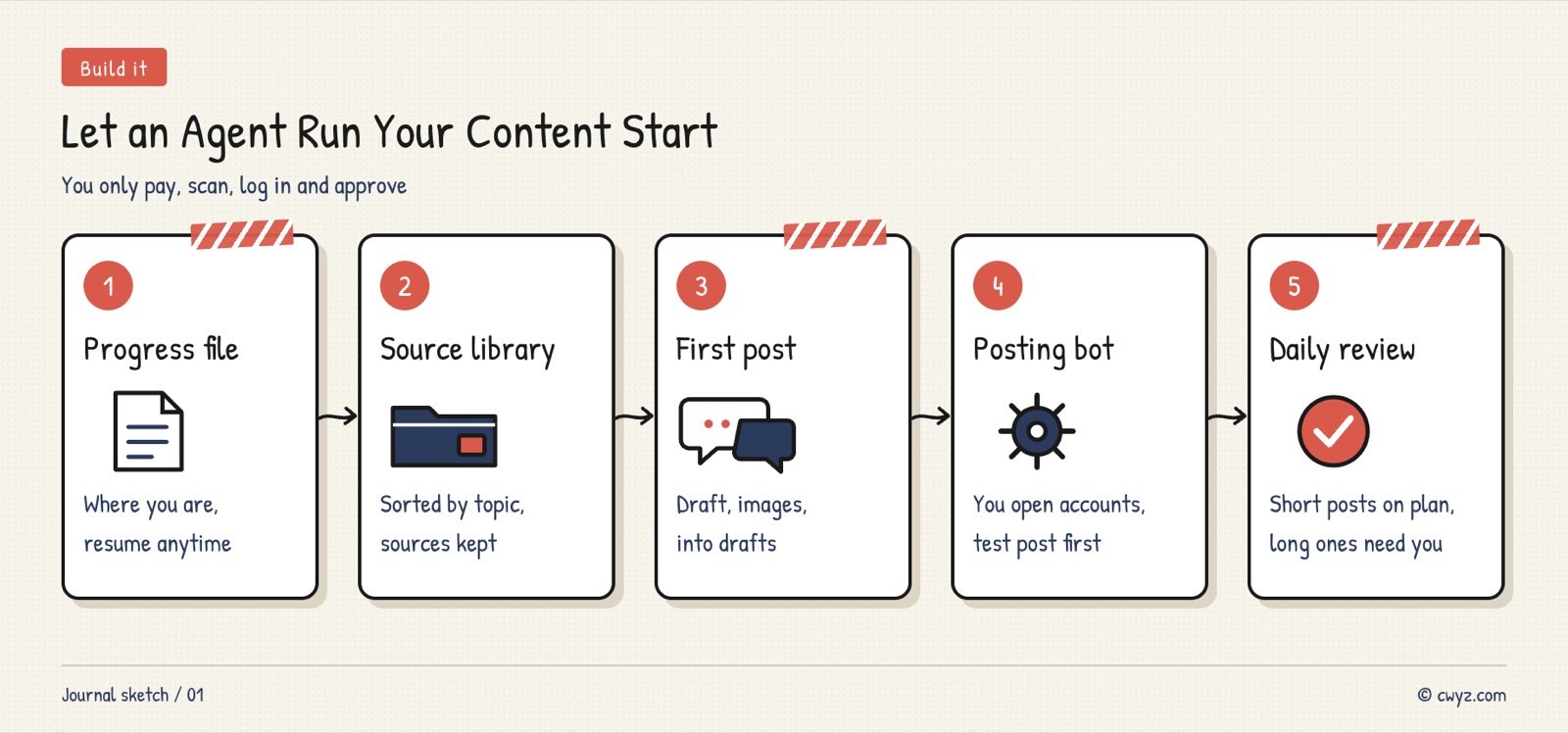
You don't have to use this toolkit. Any AI agent that can read and write local files can follow the same approach. Give your AI agent the table and template below, and have it check each step against the "done when" criteria as it finishes.
Sign in to unlock this key section
New accounts get 10 free credits, plus 1 more each day you sign in (none on days you don't). Spend 1 credit to unlock and it stays open for you.
Safety Basics
- Don't walk away with full access turned on: These toolkits often ask for the highest permission level and let the agent fix its own errors. Before installing anything, check what it will install. Handle system settings and password prompts yourself.
- Keep money and accounts in your own hands: Do payments and sign-ups yourself, and do the same for logins and QR scans. Never give passwords or verification codes to your AI agent.
- You approve anything public: Review drafts before replying to comments or publishing long posts. Do the same for direct messages. Fully automated posting can get flagged as bot behavior and hurt your account.
- Use only your own material: You can organize someone else's course or paid content into your library to study it yourself. But rewriting it and publishing it could infringe copyright.
Common Pitfalls
- Going fully automatic from day one: A new account that lets a bot post heavily can easily get rate-limited or even banned. Post by hand for a while first, then hand over control slowly.
- No progress file: Explaining everything again each time you open a new window wears you down, and you quit within three days. Create the progress file in step one.
- Treating the guide as proof: The playbook only lets your AI agent follow the steps. Whether the guide is sound, and whether it can actually make money, is for you to judge.
- Spreading across too many platforms at once: Opening a WeChat Official Account, an X account, and WeChat Channels all at once means none of them gets much depth. Get one platform working before you add another.
- Letting the agent write everything: Readers can tell when there's no personal experience or opinion behind a piece. Put your own material into the content.
For another way to build a content pipeline with Grok Bot, read the case study Grok for trend tracking, Claude for writing: why the source library is the real asset. For community fixes to the most frustrating DSH problems, see The worst DeepSeek Harness problems, and how the community fixed them. Project page: iLang DSH toolkit
Where it usually breaks
- 01Turning on fully automatic posting right after opening the account.
- 02Skipping the progress file, so you explain everything from scratch each time.
- 03Treating the guide itself as proof that it works.
- 04Spreading across too many platforms at once.
- 05Letting the agent write everything, with none of your own material.
Comments (0)
No comments yet. Start the conversation.