


What You Will Get
With one computer and an API key for an AI model, you can set up your own automated penetration testing platform. The whole process uses two copy-paste prompts. Give them to your AI agent and it will get the setup done.
You don't need to know how to code, and you don't need to install scanners yourself. ARTEX packages tools like nmap, nuclei, and sqlmap inside Docker containers. You pick the targets and read the reports. Your AI agent handles the installation and troubleshooting.
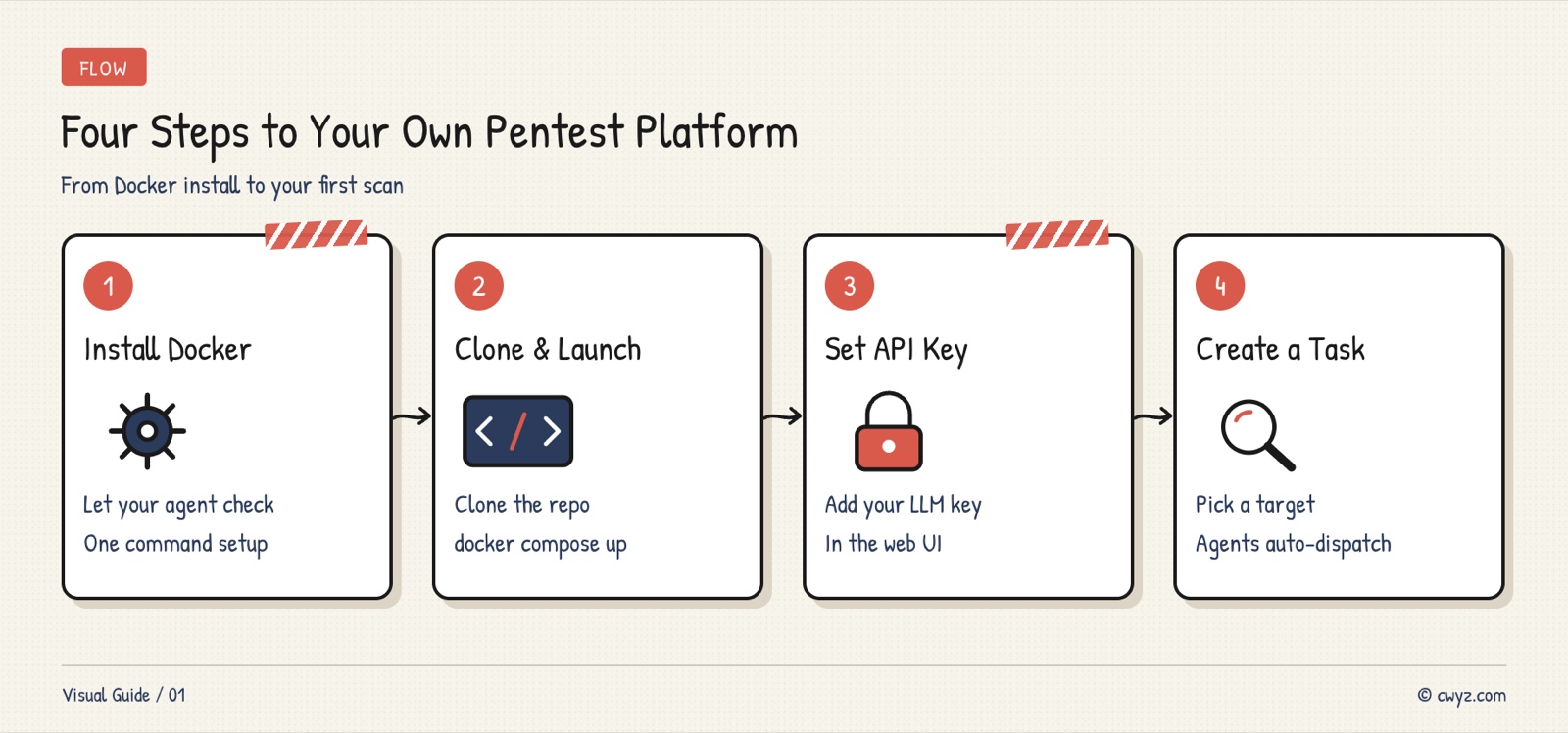
From installing Docker to creating your first scan task, the whole setup takes four steps.
What Is ARTEX
ARTEX is an open-source automated penetration testing system. Penetration testing means probing your own website or server the way an attacker would, to see whether it has any vulnerabilities.
Traditionally, you had to learn a pile of tools like nmap, sqlmap, and nuclei, run each one by hand, and interpret the results yourself. ARTEX takes a different approach. It uses an AI model as the "commander," breaks the job of "find the vulnerabilities on this website" into smaller tasks, and sends several agents to run different tools at the same time. The results go into two graphs: one records what the target has (domains, IP addresses, ports, applications), and the other records what was tried and what was found.
A few things are worth knowing. Once started, the agent runs the whole process without you stepping in, so you only need to give it a target. Every vulnerability is linked to the original request and response, so nothing is just the AI guessing. You can choose which actions require manual approval, and you can cap the scan speed and token spending. It works with Claude, GPT, and local models through Ollama.
Project page: github.com/BaaRai/ARTEX. Licensed under AGPL-3.0, with 3,600+ stars on GitHub.
Step 1: Let Your Agent Set Up the Environment
ARTEX runs inside Docker, so the first thing to check is whether Docker is installed on your computer. Copy the prompt below and give it to your AI agent. It will take care of the rest.
Help me check my environment so I can install the ARTEX penetration testing platform.

Please do these things in order:

1. Run docker --version and docker compose version to see whether Docker is installed
2. If it isn't, install Docker Desktop (macOS or Windows) or Docker Engine (Linux) for my operating system, then check again
3. Check whether git is installed, and install it if it isn't
4. Check that at least 4 GB of memory is available (Docker's default allocation is usually enough)

After each step, tell me the result. If something goes wrong, ask me before continuing.
Using a prompt instead of typing the commands yourself means the agent picks the right install method for your operating system, verifies the result afterward, and you don't have to remember any commands.
Step 2: Clone the Code and Start It
With the environment ready, have your agent download ARTEX and start it.
Sign in to unlock this key section
New accounts get 10 free credits, plus 1 more for each daily check-in. Spend 1 credit to unlock and it stays open for you.
The Setup token is a one-time password you use the first time you open the ARTEX admin panel. Once you create your own admin account, it stops working.
During the build, Docker downloads Go, Node.js dependencies, and a set of security tools (nmap, nuclei, and others). The first build is slow. With a good connection, expect about five to ten minutes.
Step 3: Initialize and Configure Your AI Model
Open http://localhost:8787 in your browser, paste the Setup token you just got, and create your admin account.
Once you're in the admin panel, go to System Settings → LLM to configure your AI model:
Model providerWhat to enterNotesAnthropic (Claude)API KeyEnter the key directly. No need to change the Base URLOpenAI (GPT)API Key + Base URL (ending in /v1)Third-party services with a compatible API also go hereOllama (local models)No key. Enter the Base URL (usually http://host.docker.internal:11434)Free, but the quality depends on the model size
After filling this in, click Save. ARTEX will test the connection automatically.
Recommended models: Claude 3.5 Sonnet or GPT-4o. They're accurate at splitting up tasks and judging vulnerabilities. If you just want to try things out, Ollama with a local model costs nothing, but its accuracy is lower.
Step 4: Create Your First Scan Task
In the ARTEX left-hand menu, click Tasks → New Task and fill in:
-
Target: your own domain or IP address, for example
example.com -
Goal: describe in plain language what you want to do, for example "Find all security vulnerabilities on this website, with a focus on SQL injection and XSS"
-
Scope: choose In Scope, which limits the scan to this target so it won't reach anyone else's servers
After you click Start, ARTEX sends out several agents (3 by default), each using different tools to probe the target.
You can watch progress live on the Tasks page, and click into a task to see what each agent is doing. The Findings page lists the vulnerabilities found so far. Each one shows its severity, along with the request and response that serve as evidence.
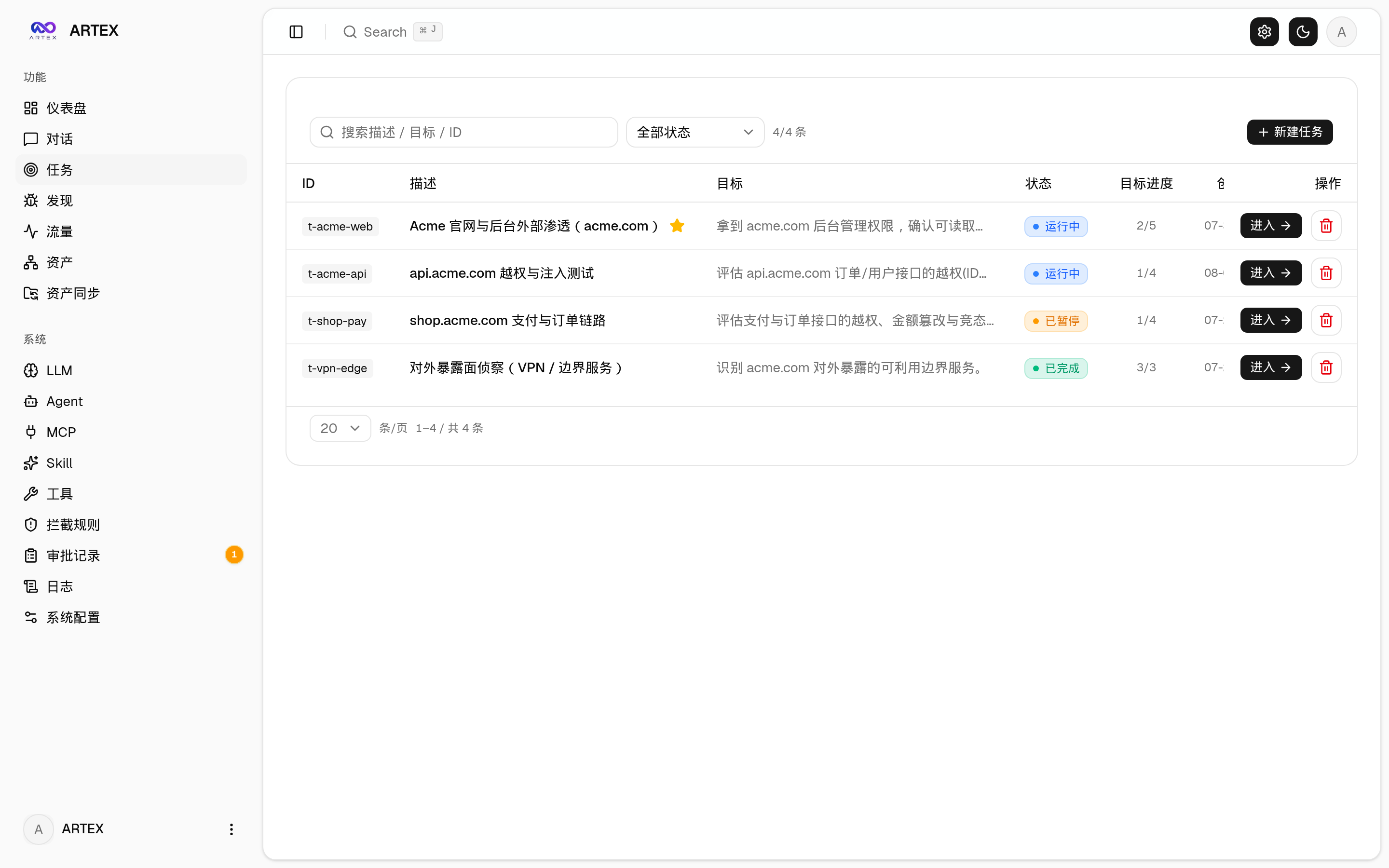
Image from the project repository.
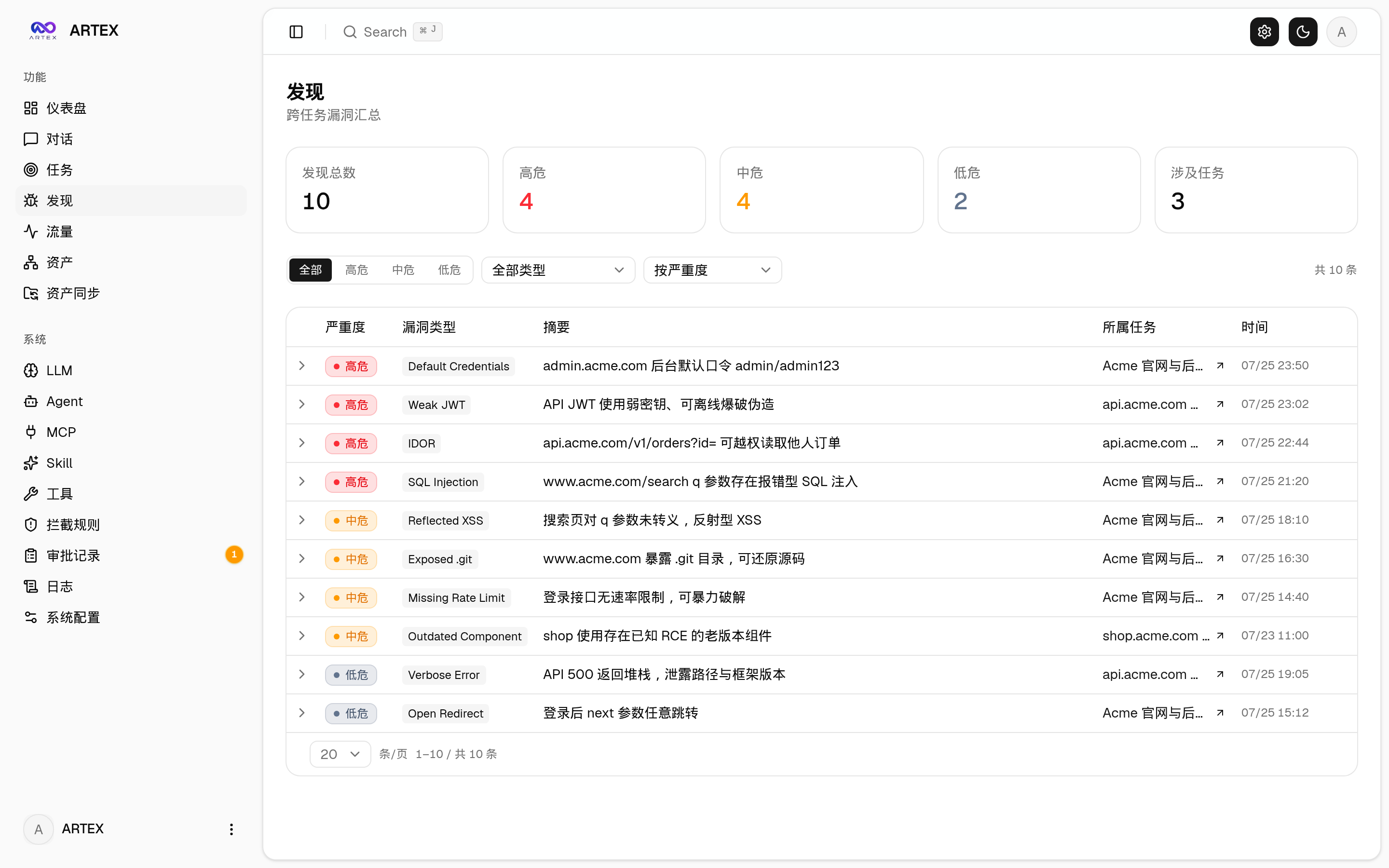
Image from the project repository.
A Few Useful Settings
ARTEX works right after installation, but it's worth adjusting these three settings.
Scan speed: change ARTEX_NOISE_PROFILE in .env. quiet sends 2 requests per second and is less likely to be noticed by the target server. balanced sends 5 and is good for everyday use. aggressive sends 20, which is faster but much noisier.
Spending cap: ARTEX_TASK_BUDGET_TOKENS limits how many tokens a single task can use. If you use a paid model, start with a low cap, such as 100000, so one run doesn't cost you several dollars.
Intercept approval: on the Intercept page in the admin panel, set rules such as "every sqlmap command needs my manual approval." Having a person review sensitive actions gives you more peace of mind.
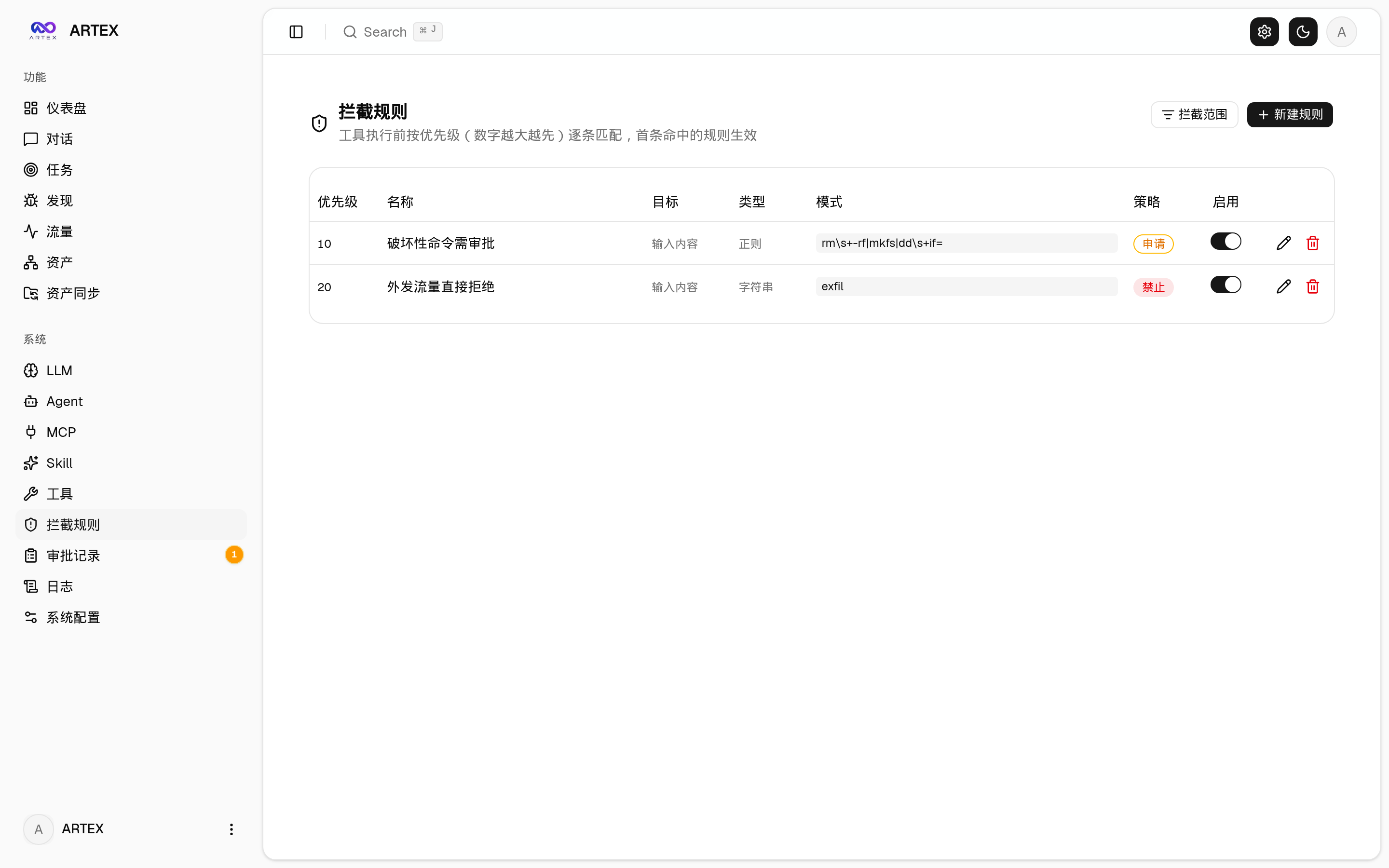
Image from the project repository.
Notes
-
Only scan targets you own or have clear written permission to test. Scanning someone else's server is illegal, and the ARTEX license explicitly forbids it.
-
The first Docker image build downloads a lot, so make sure your connection is stable. If it gets interrupted, delete the containers and run
docker compose up -d --buildagain. -
The token budget resets on restart because it's stored in memory. After restarting the service, check your settings again.
-
Not every vulnerability the agent reports is accurate. ARTEX has a Retest feature that lets the agent run the check again to confirm the finding. Retest before you write up a formal report.
Comments (0)
No comments yet. Start the conversation.