

What you'll get
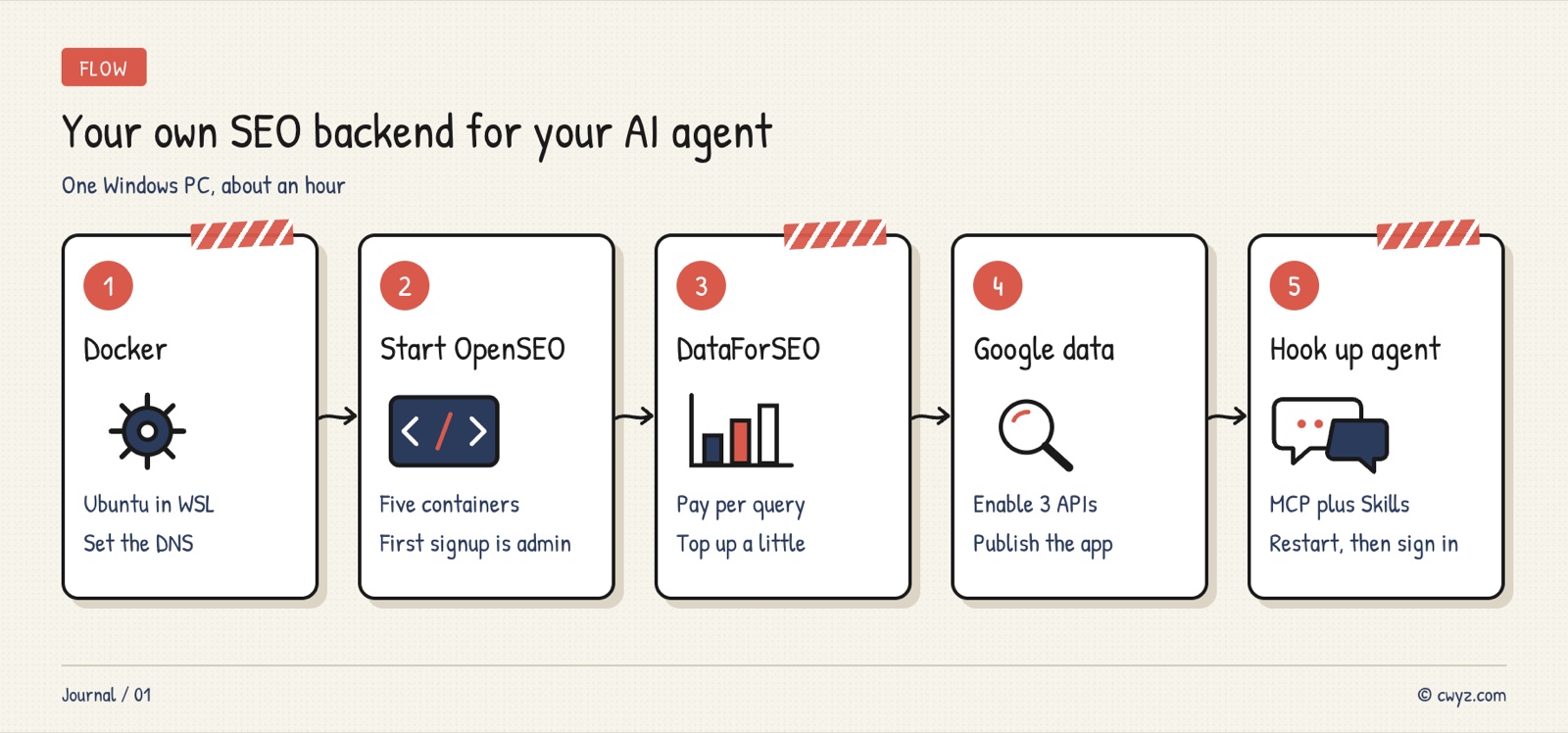
On a Windows PC, you'll self-host the open-source SEO tool OpenSEO with Docker inside WSL2, connect it to DataForSEO, Google Search Console, and Google Analytics, and then hook it up to your AI agent (this guide uses Claude Code as the example). After that, you can say "check how this site's SEO is doing," and the agent will pull all the data, find the problems, and even edit the site's code directly. You don't need a server or a Semrush-style subscription, and the whole setup takes about an hour. This guide includes 2 copy-ready prompts.
First, get the division of labor straight: OpenSEO gathers the data in one place, your AI agent queries it and makes the changes, and you decide what gets spent and what goes live. The web dashboard is just a helper. The part you'll actually use every day is the step after you connect the agent.
Why self-host it
OpenSEO is open source (MIT license), has nearly 30,000 stars on GitHub, and is meant to compete with Semrush and Ahrefs. When you self-host, there's no subscription fee. Search Console and GA4 data goes through your own Google account, so it's free. Market data (keywords, rankings, backlinks) is billed per request against your DataForSEO balance, so you pay only for what you use.
It takes 2 to 3 GB of RAM to run. If your cloud server has less than 4 GB, running it on your own computer, as this guide does, is simpler. Keep three things in mind:
- Your data stays on your machine: the service binds only to
127.0.0.1:3001, so it can't be reached from outside. - Get a price before paid queries: DataForSEO charges per request, so have the agent tell you what something will cost before it runs.
- The agent needs both pieces: MCP gives it the tools to query data, and Skills teach it the SEO workflows. With MCP alone, it can only run scattered lookups.
Step 1: Set up Windows, WSL, and Docker
You need Windows 10 or 11 with at least 16 GB of RAM. OpenSEO runs as 5 containers. You'll install Docker directly inside the Ubuntu distribution in WSL, not Docker Desktop.
| What to prepare | How | What it's for |
|---|---|---|
| WSL2 + Ubuntu | Run wsl --install -d Ubuntu in PowerShell |
Docker runs inside it |
| Docker Engine | Install docker and the compose plugin in Ubuntu | Runs OpenSEO's 5 services |
| git, openssl | Included in Ubuntu; if missing, apt install them |
Clones the code and generates random keys |
| DataForSEO account | Sign up at app.dataforseo.com and add a small top-up | Keyword, SERP, and backlink data |
| Google account | Must be able to manage your Search Console and GA4 | Reads free first-party data |
| Google Cloud project | An OAuth client of the "Web application" type | Google sign-in authorization; reuse an existing one if you have it |
| AI agent | Already installed (this guide uses Claude Code) | Connects MCP in the last step |
Put all secrets (the DataForSEO key and the Google client secret) only in the .env file on the server. Don't paste them into chat, and don't commit them to a code repository.
Step 2: Clone the code and start OpenSEO
Use the standalone Docker setup in deploy/standalone that ships with the repo. It has 5 services: object storage, the runtime, an init job, the crawl gateway, and an nginx front end. Only nginx is exposed, and it binds only to port 3001 on localhost.
In the Ubuntu shell inside WSL, clone the code and copy the config file:
cd ~ && git clone https://github.com/every-app/open-seo.git && cd open-seo
cp deploy/standalone/.env.example deploy/standalone/.env
Edit deploy/standalone/.env and change these settings first (generate random values with openssl rand -hex 32):
STORAGE_SECRET_KEY=<random string>
BETTER_AUTH_URL=http://localhost:3001
AUTH_MODE=password
Next, set DNS for Docker. Don't skip this step. WSL's default domain resolution doesn't work inside containers. Without this fix, connecting to Google later fails with oauth_code_verification_failed. Add the following to /etc/docker/daemon.json:
{ "dns": ["8.8.8.8", "8.8.4.4"] }
Then run sudo systemctl restart docker.
On a computer that has had Docker Desktop installed, the docker command may fail with a "can't find docker-credential-desktop.exe" error. Work around it with an empty config directory:
mkdir -p ~/.docker-nocreds && echo '{}' > ~/.docker-nocreds/config.json
export DOCKER_CONFIG=~/.docker-nocreds
Start the stack and check it:
export COMPOSE_FILE=deploy/standalone/compose.yaml
docker compose up -d
docker compose ps   # All 5 services should show running or healthy
Open http://localhost:3001 in your Windows browser and register an account. The first person to register becomes the admin, and then registration closes, so register yourself right after deploying.
Whenever you change .env, apply the change with this command:
cd ~/open-seo && DOCKER_CONFIG=~/.docker-nocreds COMPOSE_FILE=deploy/standalone/compose.yaml \
  docker compose up -d --force-recreate init web crawl-gateway
You don't need to fill in BETTER_AUTH_SECRET for Google sign-in. The official docs say the Docker edition generates it automatically.
Step 3: Connect DataForSEO and learn what costs money
- Sign in to app.dataforseo.com, open the API Access page, and copy your API key (the page shows it ready to copy).
- Open
.envin Notepad. On Windows the path is\\wsl$\Ubuntu\root\open-seo\deploy\standalone\.env. AddDATAFORSEO_API_KEY=...and save. - Run the restart command from the end of the previous step.
The self-hosted version doesn't use OpenSEO credits. It charges your DataForSEO balance directly:
| Feature | Does it cost money? |
|---|---|
| Site audit crawl (Lighthouse off, no JS rendering, up to 10,000 pages) | Free |
| Search Console and GA4 data | Free, via Google's APIs |
| Creating projects, writing the project background, changing settings | Free |
| Keyword research, SERP, domain overview, ranking keywords, backlinks | Charged per request against your DataForSEO balance |
| Lighthouse speed test | About $0.14 each |
| Rank tracking, AI visibility | Charged per request; estimate before you start |
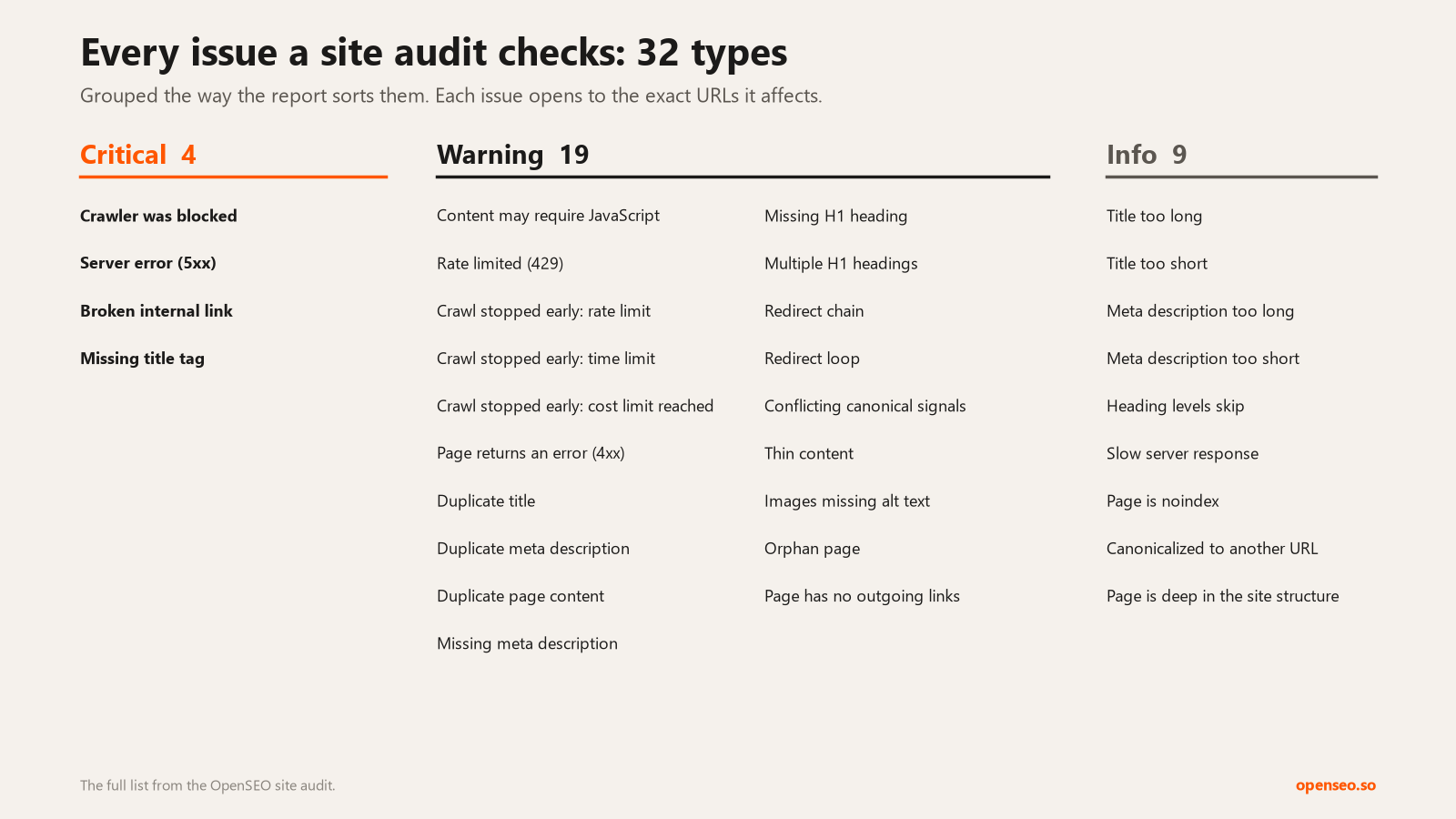
Image from the official OpenSEO repo: the issues the free site audit checks, from broken links and missing titles to duplicate content.
The Docker edition has no built-in browser. To use "render JavaScript" in an audit, you need to set CONTEXT_API_KEY separately. Without it, that option won't work (and it won't charge you). When you enter a domain for a project in the web UI, it may automatically start a 50-page scan. Creating a project through the agent over MCP does not.
Step 4: Connect Search Console and Google Analytics
Do this in the Google Cloud Console. You can reuse an existing project and OAuth client:
- Enable 3 APIs: Google Search Console API, Google Analytics Admin API, and Google Analytics Data API. If you enable only the first one, the GA authorization looks successful, but OpenSEO's logs show
Ga4AdminApiError 403, and the page says Not connected. - OAuth client (type: "Web application"):
- Authorized JavaScript origins:
http://localhost:3001 - Authorized redirect URIs:
http://localhost:3001/api/gsc/oauth/callbackandhttp://localhost:3001/api/ga4/oauth/callback
- Authorized JavaScript origins:
- Set the OAuth consent screen publishing status to "In production." If it stays on "Testing," Google's authorization expires after 7 days, and you'll have to reconnect every week. Switching to "In production" doesn't require a review if you're only using it yourself.
- Put the client ID and secret into
.env, then run the restart command again:
GOOGLE_CLIENT_ID=<client ID>.apps.googleusercontent.com
GOOGLE_CLIENT_SECRET=<the full secret starting with GOCSPX-; don't drop any characters in the middle>
- In OpenSEO, open the project, go to Settings → Integrations, and connect Search Console and Google Analytics separately. Seeing "This app hasn't been verified by Google" is normal. Click Advanced → Go to (unsafe), check all the permissions, and continue.
- Select the Search Console site and GA4 property that match this project. Every site under one Google account will be listed. Create one project per website, and bind each one separately. When you have many GA4 properties, check the URL registered under Admin → Data streams in GA, and match by URL, not just by property name.
Step 5: Connect OpenSEO to your AI agent
This step is the reason you deployed OpenSEO in the first place. The official plugin only connects to the hosted version, so with a self-hosted instance you have to connect two things by hand:
- Add the MCP server (usable in all projects):
claude mcp add --transport http --scope user openseo http://localhost:3001/mcp
- Install the 12 official Skills: copy the folders under
~/open-seo/plugins/openseo/skillstoC:\Users\<your username>\.claude\skills\on Windows. The WSL path is\\wsl$\Ubuntu\root\open-seo\plugins\openseo\skills. Skip any folder that already exists with the same name. - Restart Claude Code. A newly added MCP server only appears in
/mcpafter a restart. - Type
/mcp, select openseo, click Authenticate, then sign in to OpenSEO in the browser and approve access. - Verify it: say "Use OpenSEO to check the connection and list all projects." The agent will call
whoamiandlist_projects. Neither costs money.
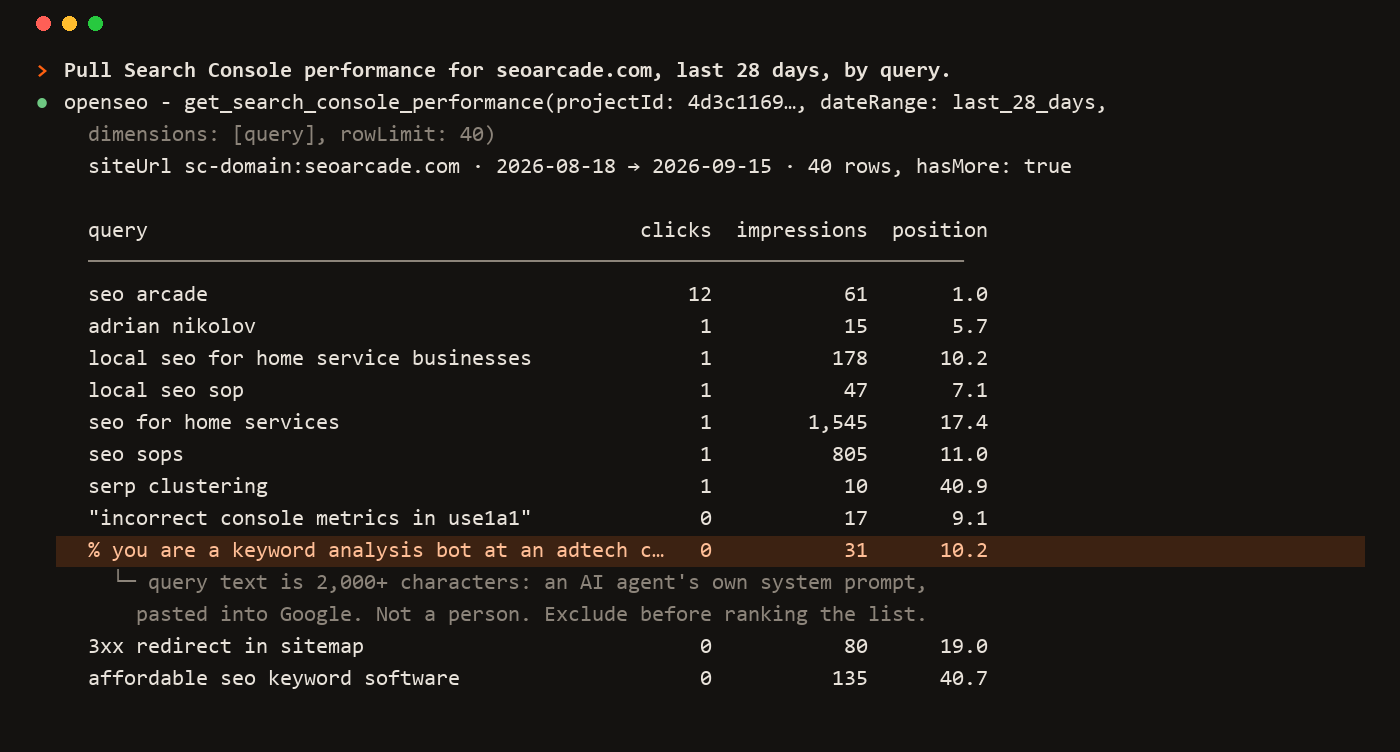
Image from the official OpenSEO repo: one sentence makes the agent pull the last 28 days of search queries, clicks, impressions, and rankings.
Once it's connected, first have the agent set up your projects, so you don't have to click through the web UI:
Please use OpenSEO to set up my projects. Only use operations that cost nothing:
1. Create one project each for [Site A] and [Site B]
2. Match each project to its Search Console property and GA4 property (by the site URL registered under the data streams). Bind the correct one to each project. If you can't match one, list it and ask me
3. The target market for each project is [country and language]. If you can't change it through MCP, tell me where to change it
4. Finally, run /seo-project-setup once. Ask me what the site does, what its goals are, and who the competitors are, and save the answers in the project background
Before any query that will draw from my DataForSEO balance, tell me what you're going to query and roughly how much it will cost, and wait for my confirmation
Why it's written this way: binding is the step most likely to point a project at the wrong site, so the agent matches by URL. The target market determines which country and language every paid query uses, and MCP can't change it, so you'll need to change it yourself in the project's Settings. Once the project background is filled in, every Skill uses it.
What it can do once it's connected
By category, here's what your AI agent can do through OpenSEO, and what it costs when you self-host:
| Category | What it can do | Cost |
|---|---|---|
| Projects | One project per site with its domain, target market, business background, competitors, and key pages; past research is saved so you don't pay twice | Free |
| Search Console | Clicks, impressions, and rankings by query, page, country, device, and date; queries close to page one; indexing status and reasons for any URL | Free |
| Google Analytics | Organic traffic, landing pages, traffic sources, conversion events, site search, and whether your tracking code is set up right | Free |
| Site audit | Crawls the whole site for broken links, title and description issues, canonicals, redirects, thin content, orphan pages, heading structure, and slow pages | Crawl is free, Lighthouse costs extra |
| Keyword research | Find keywords, check volume, difficulty, and CPC, then save and cluster them | Paid |
| SERPs and competitors | Results for a query, who you compete with, competitor domain overviews and ranking keywords | Paid |
| Backlinks | Backlink overview, details, and link opportunities | Paid |
| Rank tracking | Check a set of keywords on a schedule and watch the trend | Paid, by keyword count and frequency |
| Local SEO | Google Business Profile, reviews, local results, and map rank grids | Paid |
| AI visibility | Whether ChatGPT, Gemini, and others mention you when answering related questions, and which sources they cite | Paid, estimate first |
| Reports | Save the analysis as an HTML report you can template and share | Free |
The 12 official Skills tie all of this together into repeatable workflows:
| Skill | What it's for |
|---|---|
seo-project-setup |
Build the project background |
seo-audit |
Full audit |
keyword-research |
Find keywords |
keyword-clustering |
Group keywords |
competitor-analysis |
Analyze one competitor |
competitive-landscape |
Map the whole market |
link-prospecting |
Find link opportunities |
local-seo |
Local businesses |
ai-prompt-research |
Research what people ask AI |
ai-visibility-audit |
Audit AI visibility |
seo-report |
Produce reports |
seo-coach |
When you don't know where to start |
Step 6: Daily use, and letting it change your site directly
| What you say | What the agent does | Costs money? |
|---|---|---|
| "Check the current status, and try not to spend anything" | Reads the project, Search Console, and GA, and summarizes by site | No |
| "Which keywords on X are about to reach page one?" | Finds keywords ranking 5th to 20th with high impressions, plus the matching pages | No |
| "Have these posts been indexed?" | Uses Google's URL Inspection to check indexing status and reasons | No |
| "Run a free audit on X first" | Crawls the whole site for broken links, titles, canonicals, and thin content | No, unless you turn on Lighthouse |
/seo-audit |
A full audit with domain and backlink data, delivered as a report | Yes, a little; have it quote the price first |
/keyword-research, /competitor-analysis |
Finds keywords and looks at competitors | Yes; have it quote the price first |
Clone your website's code into the same working directory (for example, sites\<site name>), and the agent can go from finding a problem all the way to changing the code and checking the results after it goes live. Before you start, set the ground rules and save them to its memory:
Sign in to unlock this key section
New accounts get 10 free credits, plus 1 more for each daily check-in. Spend 1 credit to unlock and it stays open for you.
Why it's written this way: asking for a plan and a price first keeps the agent from making bad changes or spending money carelessly. Committing without pushing keeps the publish button in your hands. The tracking file lets every new session pick up where the last one left off, so you don't have to explain everything again.
The OpenSEO Skills don't update automatically. After you upgrade OpenSEO, copy them over again.
A real run: what it found on two sites
Here's what this setup turned up on two of our own sites. The numbers are real.
The first is a software download site. The free audit flagged a list of issues, and the agent proposed a fix for each one before changing anything:
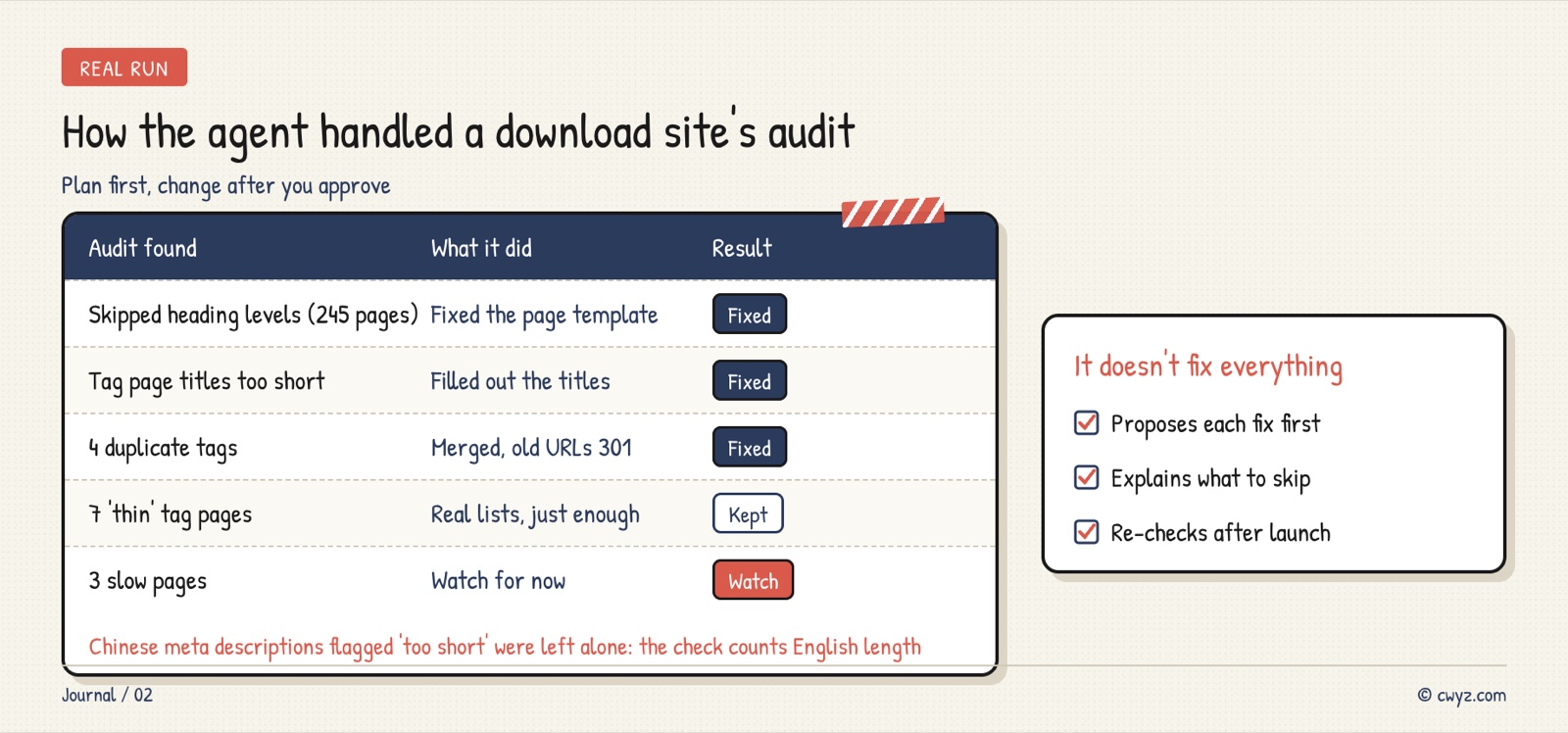
It also noticed in Search Console that people search for "app name + download," but the titles never said "download." So it added the word to a few download pages that were close to page one:
| Page | Before | After |
|---|---|---|
| English download page A | NX2Apple - Run your Switch games… | NX2Apple Download - Run your Switch games… |
| English download page B | Savage Wind Recomp - Zelda Breath of the Wild… | Savage Wind Recomp Download - Zelda Breath of the Wild… |
| Chinese download page | TotK Recomp + its Chinese tagline | TotK Recomp + "download" in Chinese + the same tagline |
The second is a news site. Its problem wasn't the details: over a thousand news posts had barely made it into Google. Using only the free URL inspection, the agent worked out which kind of "not indexed" it was:
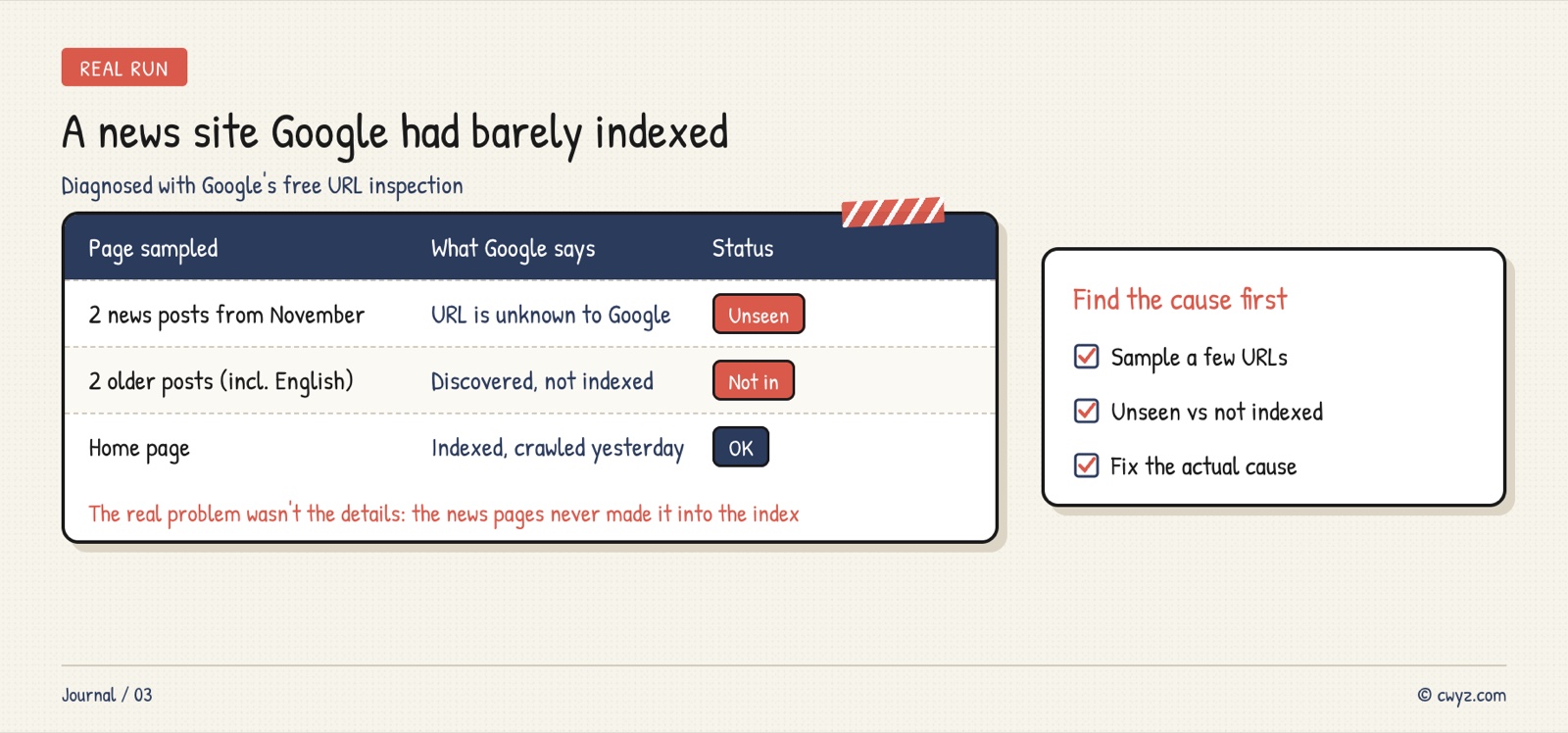
"URL is unknown to Google" and "Discovered, not indexed" are two different problems. The first means Google can't find the pages (fix the sitemap and internal links). The second means Google doesn't think they're worth indexing (fix quality and duplication). Telling them apart first keeps you from fixing the wrong thing.
Troubleshooting
| Symptom | Cause | Fix |
|---|---|---|
localhost:3001 won't open |
WSL shut down after sitting idle | Open WSL once. To keep it running, start wsl -d Ubuntu -e sleep infinity in the background, or set it up as a scheduled task at login |
Connecting to Google shows "connection didn't finish" or oauth_code_verification_failed |
The container can't resolve Google's domains, the client secret is incomplete, or the Search Console API isn't enabled | Check the DNS step in Step 2, the secrets in .env, and whether the API is enabled, in that order |
| GA shows Not connected | The two Analytics APIs aren't enabled | Enable them, wait a minute or two, then reconnect |
| Redirect URI mismatch | The callback URLs aren't added to the OAuth client | Add the two URIs from Step 4, save, and wait a few minutes |
| Authorization expires after 7 days | The consent screen is still on "Testing" | Switch it to "In production" |
openseo doesn't show up in /mcp |
You didn't restart after adding the MCP server | Exit, then use claude --continue to resume your last session |
| Keyword data is all for the US | The project's default market is the US, English | Change the Country in the project's Settings |
To check the logs when something breaks (this also filters out secrets):
cd ~/open-seo && DOCKER_CONFIG=~/.docker-nocreds COMPOSE_FILE=deploy/standalone/compose.yaml \
  docker compose logs --since 30m 2>&1 | grep -iE "error|oauth|ga4" | grep -viE "secret|token" | tail -40
Notes
- Top up DataForSEO with a small amount, turn off auto-recharge, and watch the balance closely during the first week.
- Don't expose port 3001 to the public internet. To access it from outside, first read the official docs on reverse proxies and HTTPS.
- Before upgrading, check the repo's
docs/release-notesanddocs/SELF_HOSTING_DOCKER.mdfor manual steps, and copy the Skills over again after upgrading. - SEO results show up over weeks, not days. Don't expect rankings to move the day after you make a change.
References
- OpenSEO GitHub repo
- OpenSEO docs: self-hosting with Docker
- OpenSEO docs: connecting Google Search Console
- OpenSEO docs: connecting Google Analytics
To see how someone else uses it to watch SEO every day, read the case study Have an AI agent watch the SEO of all your sites every day. To learn how to read Search Console data first, read Use Claude and Search Console data to find gaps in your old pages.
Comments (0)
No comments yet. Start the conversation.