

Someone went through the GitHub skills built for office work and pulled out 39 candidates. They sorted them into ten categories, from PowerPoint and Word to Excel, resumes and translation, and ranked them from "try first" to "skip." According to the ranking's author, there are more than 200 PowerPoint skills alone, with star counts ranging from over 100,000 down to zero. We regrouped the list by the job you actually need done, and we checked the main repositories for star counts, licenses and latest update dates. Don't judge an office skill by its star count. Judge it by whether the files it hands back are ready to use.
The Shortlist
| What you need to do | Try this first | Try this instead | Skip it |
|---|---|---|---|
| Slides that others will edit | PPT Master: one document in, a natively editable PPTX out, with charts and animations, plus narration | Anthropic's official pptx skill: solid, but the design is average | API wrappers that need a separate paid service |
| Slides you present yourself | guizang-ppt-skill: two built-in magazine-style design themes, a single HTML file, and a presenter view | frontend-slides: shows three style previews first, then generates web slides | Options that look great but can't export an editable file, which gets your colleagues stuck when they want changes |
| Editing Word or writing official documents | Anthropic's official docx skill: keeps tracked changes and comments | For Chinese government-style official documents, use dyz-gongwen-skills, which formats them to the Chinese national standard. To follow a company template, use brand-docs. | Old replacements that are no longer maintained and have no license |
| Spreadsheets and financial models | Anthropic's official xlsx skill: uses only live formulas and checks for formula errors itself | invoice-organizer for filing invoices and receipts | Tools that only produce statistical reports and don't hand back a cleaned-up spreadsheet |
| Working with PDFs | Anthropic's official pdf skill: fills forms, splits and merges files, and extracts tables | GenOffice for editing a whole set of documents locally (you need your own API key) | Unmaintained third-party versions |
| Meeting notes and to-dos | Anthropic's official knowledge-work-plugins: asks you before adding action items to your to-do list | call-notes-to-actions if you only want "notes in, decisions and action items out." It's under 100 lines. | Personal scripts with the author's own file paths and accounts hard-coded |
| Writing cold emails | cold-email from marketingskills: before drafting, it asks who the recipient is, what you want them to do, and what cases or data you have | None | Anything that sends emails for you automatically |
Star counts (checked November 17, 2026): PPT Master has about 78,000. Anthropic's official skills repo has about 197,000, but that number covers the whole repo, not a single skill. guizang-ppt-skill has about 30,000. frontend-slides has about 32,000. knowledge-work-plugins has about 36,000.
The tiers reflect the author's subjective ranking. We only checked star counts, licenses and update dates. We didn't install and test each skill.
Why Pick This Way: Three Reasons
- The file format decides whether you can use it: Two skills can both "make a PPT." One hands back a native PPTX that your colleagues can keep editing. The other hands back an HTML page that looks great but sends you back to your agent for every change. Before you choose, figure out who will edit the result.
- Skip unmaintained skills and skills without a license, however good they look: Office file formats and the way agents read them keep changing, so a skill nobody has touched in months will soon break. A skill with no license means you don't have clear permission to use it.
- Know whose stars you're looking at: Official repos and big collections count stars for the whole repo. One skill inside it may have few users. Meanwhile, a small skill with a few dozen stars may be exactly what you need.
Learn It: Five Steps to Pick Your Office Skills
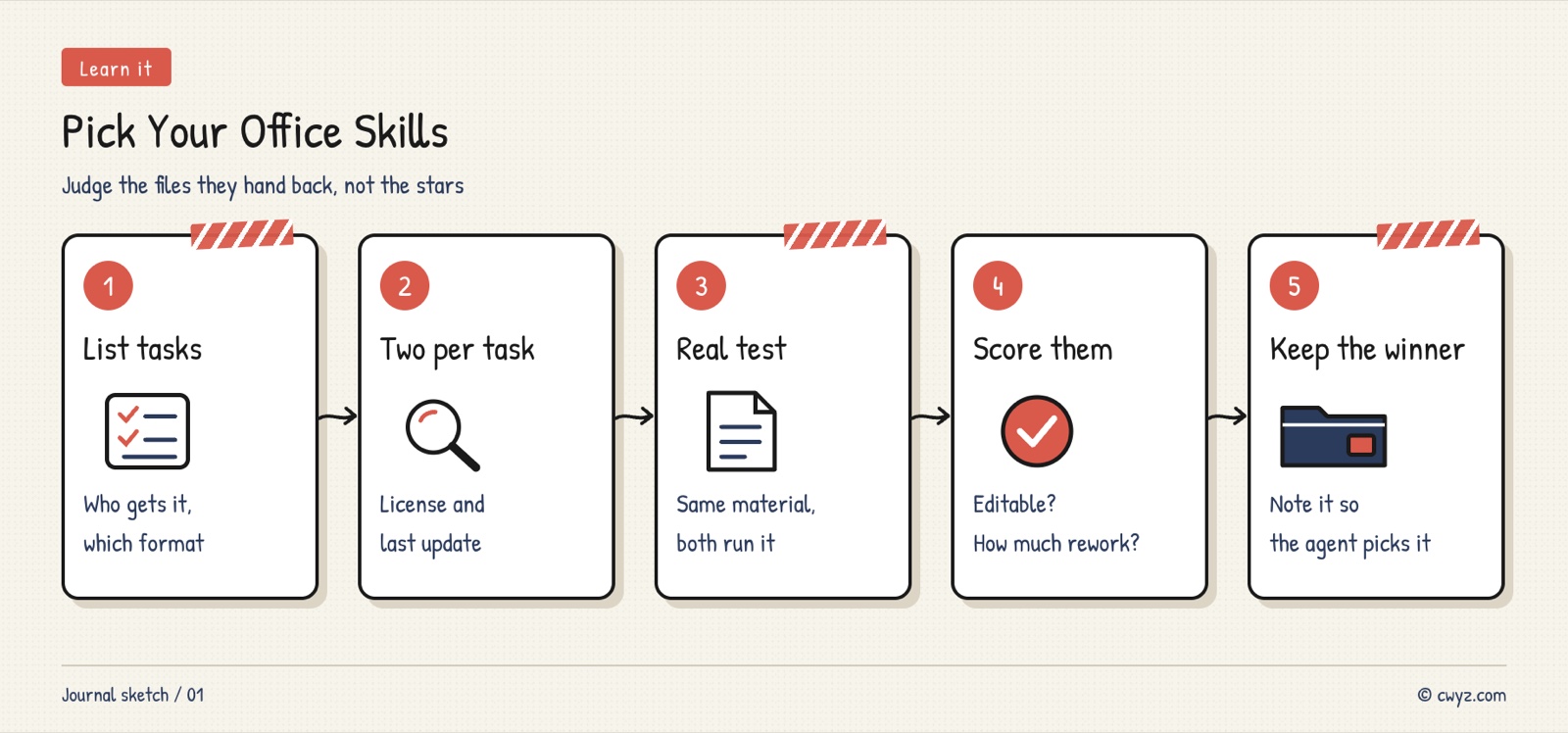
Don't install a pile at once. Give the table and template below to your AI agent, and have it check its work against the completion criteria after each step.
Sign in to unlock this key section
New accounts get 10 free credits, plus 1 more each day you sign in (none on days you don't). Spend 1 credit to unlock and it stays open for you.
Safety Basics
- Test with non-sensitive material: Hold off on contracts, salary data and customer lists. Some skills call online services.
- Draft emails, don't send them: Let your agent write cold emails and replies, then press send yourself.
- Check the license before commercial use: For example, guizang-ppt-skill uses AGPL-3.0. If you modify it and distribute it, you must publish your source code. Several of Anthropic's official document skills have public source code but are not under an open-source license, so follow the terms they state.
Common Pitfalls
- Installing a dozen at once: Skills compete to trigger, and your agent doesn't know which one to use. Keep just one per type of task.
- Being fooled by the whole repo's stars: A big collection with hundreds of thousands of stars doesn't mean the one you need works well. Trust the results from testing with your own material.
- Judging by the preview images alone: The screenshots in a repo are the best examples the author chose. Run the skill on your own material to see how much rework you'll face.
- Forgetting who will edit the file: If you pick a tool that only outputs a web page for a deck your colleague must edit, you'll end up redoing it.
- Installing an unmaintained old skill: It works at first, then breaks when Office or your agent updates, and nobody fixes it.
Want to start making editable PPT files right away? Read the beginner tutorial Turn Documents into Editable PPT Slides with PPT Master. For Word, Excel and PowerPoint together, read How to Get Word, Excel and PowerPoint Files from Your AI Agent Without Broken Layouts.
Where it usually breaks
- 01Installing a dozen at once, so the skills compete to trigger.
- 02Being fooled by the star count of a whole repo.
- 03Judging by preview images only and never testing with your own material.
- 04Forgetting who will edit the file and picking the wrong format.
- 05Installing an unmaintained old skill that breaks after the next update.
Comments (0)
No comments yet. Start the conversation.