

What You Will Get
This tutorial covers the stretch before an AI commercial goes into production: understanding the product, choosing the format, defining the core message and creative idea, writing scripts you can actually shoot, setting up characters and a visual style you can reuse, and finally reviewing the finished cut with a checklist. It does not cover how to generate images or video with a specific model. That comes next. The article includes 4 copy-ready prompts that have your AI agent research the product, develop creative concepts, write short scene scripts, and check the finished cut.
Start with the division of labor: let your AI agent handle the legwork, and make the creative calls yourself. Generating a shot keeps getting cheaper, but the cost of a film that doesn't make its point hasn't changed. The most common reason for reshoots is that nobody settled what the film should say before production started.
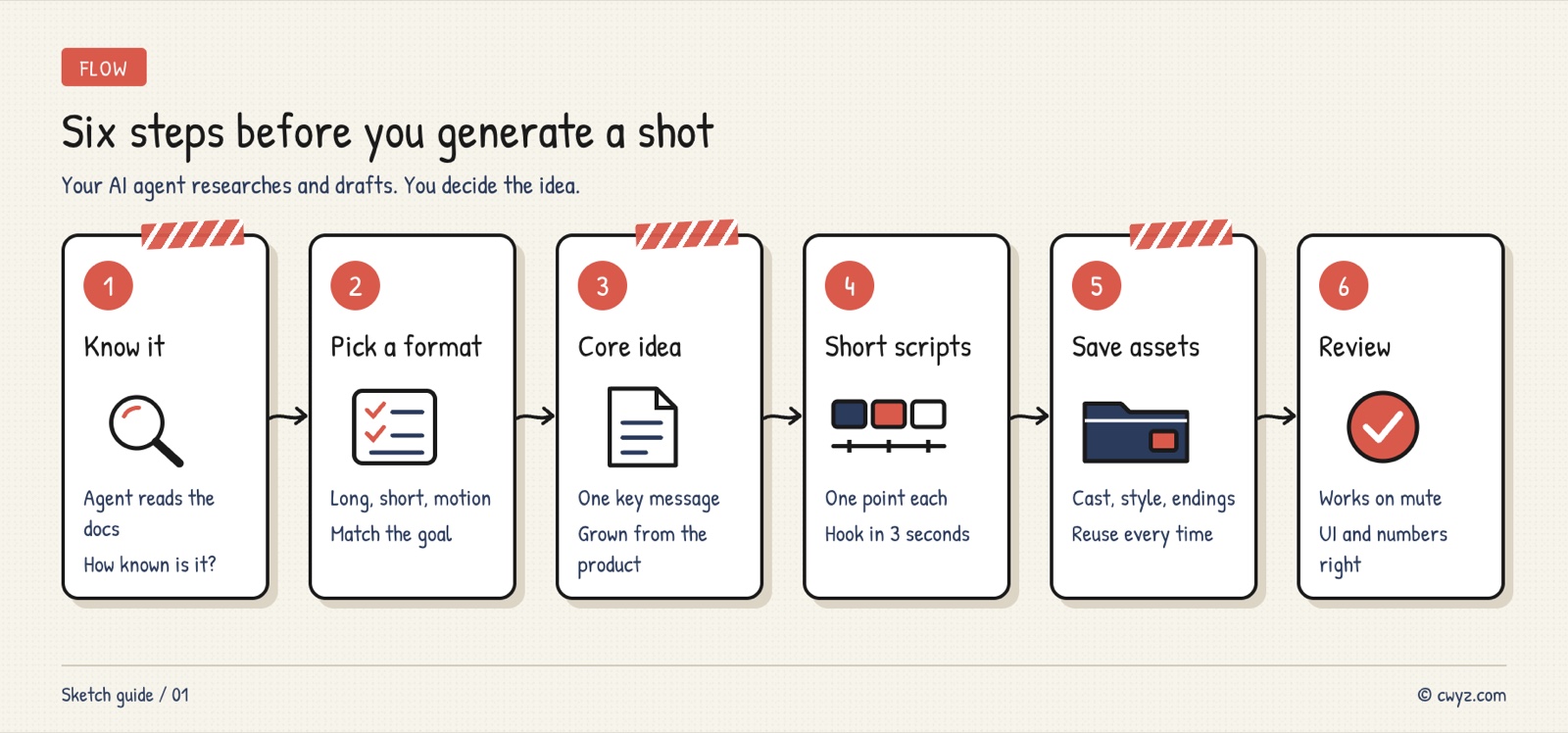
The six steps: have your AI agent thoroughly understand the product first, choose a format based on your goal, define the core message and creative concept before writing a long film, keep each short ad to one selling point, hand interface and workflow scenes to code-driven motion graphics, store characters and style in an asset library, and review the finished film against a checklist.
Why Think Before You Generate
AI has made "shooting" so cheap that many people open a video generator and keep rerolling generations until something looks right. The usual outcome falls into three patterns. The visuals look great, but viewers finish without knowing what the product does. Each shot works on its own, but the sequence has no cause and effect. When the product updates, none of the earlier work can be reused.
All three problems start before production. Keep an eye on these three things:
- Does the audience know you? This decides whether the film should first explain "what it is" or go straight to attitude.
- One message per film: A 30-second short can't fit three selling points.
- Can it be reused? Once characters, visual style and end cards are locked down, every later film takes half the effort.
Step 1: Have your AI agent research the product first
Before writing any script, figure out how much your viewers already know about the product.
- Unfamiliar: Most new products and niche tools fall here. The film needs to explain quickly what it is and whose problem it solves before anything else.
- Already well known: Big brands don't need to introduce themselves, so they can spend the runtime on attitude and story. Red Bull's 2012 stratospheric skydive, which the brand sponsored, is a classic example. It barely talks about the drink. It shows the energy the brand has always stood for.
This is the step to hand to your AI agent. It can read the website, documentation, app store reviews and competitor pages, then compile a product profile you can check, and collect the brand's fonts, colors and interface screenshots into an asset library. Throughout this article we'll use a fictional example: Ledger, an app that handles bookkeeping and invoicing for freelancers.
I want to make a set of ads for [product name, e.g. Ledger]. First, help me understand the product thoroughly. Sources: [website URL, help docs, app store page, or the files I put in this folder].

1. Answer these five questions in plain language, with no more than three sentences per answer. What is it and what does it do? Who needs it most, and when? What do the target viewers already know, what are they missing, and what worries them most? Which platform will the film run on? What do we want viewers to do after watching?
2. Judge how familiar viewers are with it (unfamiliar / has heard of it / very familiar), and explain why.
3. Copy the slogans, feature names and prices exactly as they appear on the website, and note where each one came from. Anything you summarize yourself should be labeled "inference."
4. Save the brand color (hex value), font name, logo and 3 to 5 screenshots that best represent the product into a brand-kit folder, and send me a list of what you saved.
5. Only read the sources. Do not create accounts, pay for anything, or contact anyone on my behalf. List anything you're unsure about as questions for me.
The third point matters most. When you write scripts later, every feature and number must trace back to the original text. Once a selling point the AI made up ends up on screen, it's harder to fix than a broken image. After you have the profile, use the product yourself. Some of what feels smooth or awkward only shows up once you've used it.
Step 2: Choose the format for your goal
The same product needs different kinds of films for different goals:
| Film type | Length | When to use it | Where it most often goes wrong |
|---|---|---|---|
| Brand film | 1 to 3 minutes | Launches and homepage video, where the full value needs to be told | Features piled up as a list with no through-line |
| Scene short | 15 to 60 seconds | Social ads, one selling point per film | Slow opening, so viewers scroll past in the first few seconds |
| Code-driven motion graphics | No limit | Explaining how an interface works or how data moves | Little emotional pull, reads like a manual |
| Talking head with visuals | Follows the voiceover | A founder or host talks while visuals add detail | Visuals don't match what's being said |
| Mixed film | No limit | AI video plays people and settings, code-driven motion graphics plays the interface | The two visual styles don't blend, and brand colors drift |
The next sections focus on the first three.
Step 3: For brand films, define the core message before the creative concept
Brand films most often fail by trying to say everything. Before you start writing, write down two lines:
- Core message: The one sentence viewers should remember when the film ends, written as "who, in what situation, and what they get from it." For Ledger, it could be: freelancers, busy with client work and no time for bookkeeping, get their bills and invoices sorted out automatically.
- Creative concept: The device that carries this sentence on screen. It can be a character, a metaphor or a small world. Every feature is then performed inside that concept.
Software has no physical form, and a plain screen recording rarely moves anyone. The best ideas usually grow out of the product's own language, not from a flashy setting pasted on from outside. Ledger is called "Ledger," so it can be played as a meticulous old-school bookkeeper with an abacus and ledger feel. A new invoice comes in, and he flicks his abacus beads to record it. A client pays late, and he writes a polite reminder letter by hand. At tax time, he slides a neat stack of ledgers across the desk. Features become the character's actions, so viewers understand what the app does for them without reading any interface. Once this setup is locked in, every short film that follows can build on it.
Have your AI agent generate a few directions, then choose among them:
Sign in to unlock this key section
New accounts get 10 free credits, plus 1 more each day you sign in (none on days you don't). Spend 1 credit to unlock and it stays open for you.
Item 2 asks for sources so the concept grows out of the product instead of being something the AI made up on the spot. The table in item 3 shows at a glance whether a concept can carry every feature. Features that don't fit get handed off to short films or code-driven motion graphics.
Step 4: Keep each scene short to one selling point
A short film runs only a few dozen seconds. Structure it around the AIDA sequence common in advertising (Attention → Interest → Desire → Action), and it has to do three things: hold viewers in the first few seconds, make one selling point clear in the middle, and tell viewers what to do next in the ending.
How to hook viewers at the start. Four common approaches:
| Approach | How it works | Ledger example |
|---|---|---|
| Create suspense | Open with an unusual image | Late at night, an old-school bookkeeper sits at your home desk working an abacus |
| Hit a pain point | Show a problem the viewer already knows | At month's end, digging through your inbox and photo album for receipts, and getting more tangled with every search |
| Before and after | Show life without the product, then with it | Left: a desk buried in loose receipts. Right: a tidy finished report |
| Show the result first | Reveal the ending, then rewind to explain it | Tax filing is done in ten minutes. Then rewind a month to see how it happened |
How to make the middle clear. Selling points are often words like "accurate," "effortless" or "secure." A camera can't show those words directly, so you need something visible that stands in for them:
- Stress test: Put the product in the toughest situation, such as 40 invoices in different formats arriving in the same month, and see whether it catches every one.
- Side-by-side comparison: Play the same scene twice, once with the books in a mess and once with every entry exact.
- Metaphor: Use one image in place of an idea. For example, a shoebox stuffed with receipts turns into a thin ledger when you close the lid.
Have your AI agent draft a few versions for you to choose from:
Write a scene short script for [product name] using [chosen creative concept], covering only this one selling point: [selling point, e.g. automatically reads invoices from a photo].

1. Write 3 versions, each 30 seconds long. Open them with three different hooks: "create suspense," "hit a pain point," and "show the result first."
2. Write each version as a shot list with these columns: shot number, seconds, visuals (describe the character's actions and the setting), dialogue or on-screen text, and sound. Mark the first 3 seconds separately.
3. Show the selling point through action or comparison. Don't use dialogue with adjectives like "super accurate" or "super convenient."
4. The final shot must clearly state what viewers should do: [download / sign up / visit a specific page on the website].
5. Use only features and numbers that have a source in the product profile. Mark anything uncertain as "to be confirmed" and don't make anything up.
Step 5: Hand interfaces and workflows to code-driven motion graphics
Code-driven motion graphics (also called MG animation) are frames generated by a program. Interfaces, text and charts are laid out by code, with no camera and no generative video involved. In ads, this approach has several advantages over AI video:
- Accurate interfaces: It uses the product's real front-end components, so you won't see the blurry text or warped buttons that show up in AI footage.
- Easy to edit and batch: After a product update, swap in the new components and render again. For a vertical version or another language, change a setting and render again.
- Shows what you can't see: You can draw how data moves or what the backend is doing as a diagram and explain it step by step.
- Precise timing: You can lock how long each frame stays on screen to the exact frame of the voiceover and music.
Its weak spot is emotion. To make viewers feel something, you still need AI video or live footage. That's why the most common approach mixes them: one shot shows an AI-generated character pulling out a phone, and the next cuts to the app screen rendered in code. Openings, lower-third captions and closing brand frames are also generated in code, so the fonts and colors stay consistent across the whole series.
If you want to make code-driven motion graphics yourself, see Let Your AI Agent Make Explainer Animation Videos on Your Own Computer for Free.
Step 6: Save characters and style as assets for every film after
A film's buzz fades within a few days, but a product needs a steady stream of new content. If you come up with new ideas from scratch every time, you can't keep up. The fix is to lock these elements in with your first film and write them up as a reference sheet:
- Characters: Appearance, outfit, personality and catchphrases, with a few reference images from different angles.
- World: Where the story takes place and how the characters relate to each other. The Ledger bookkeeper could have a small, fixed counting room.
- Visual style and brand elements: Color palette, fonts, opening and closing sequences, and transition styles.
- Script templates: Keep the structures that worked, so next time you can swap in a different feature and shoot again with minor tweaks.
The benefits add up film by film. When the same character keeps showing up, viewers recognize them the second time. Each new film extends the earlier setup, so the brand impression builds up. When you introduce a new feature, you drop it straight into the existing setup instead of starting over. Plenty of brands have done this for a long time. Michelin's tire mascot, the Michelin Man, dates back to 1894 and is still in use. Duolingo's green owl, Duo, looks the same across the app, ads and social media.
After the film is done: review it against a checklist
Run this check both during production and after the final cut. For your first few films, you can review them yourself, or have your AI agent pull frames and check each item:
| What to check | How to judge |
|---|---|
| Can you state in one sentence what this film is about? | If not, it's trying to say too much |
| Does it hold attention in the first 3 seconds? | Watch only the first 3 seconds and ask yourself whether you'd scroll past |
| Can you follow it with the sound off? | Many people scroll without turning the sound on |
| Is there cause and effect between shots? | Each shot should follow from the one before |
| Are the interface and numbers accurate? | Check each one against the real product and the profile |
| Do characters, fonts and colors match the brand? | Check against the brand-kit |
| Do viewers know what to do next? | Does the ending include a clear call to action? |
| Is the cover eye-catching enough? | Compare it side by side with popular covers on the same platform |
This is my finished ad film: [file path]. Please check it using the method below.

1. Pull one frame every 2 seconds, then pull each frame of the first 3 seconds separately, and arrange them into thumbnails for me to view.
2. Compare against the brand-kit and product profile, and answer each of the following. What is this film saying in one sentence? Is there a hook in the first 3 seconds? Can the film be understood with the sound off (judge from the visuals and captions only)? Which two shots lack cause and effect between them? Does any interface, text or number in the frame differ from the real product? Do the fonts and colors stay on brand? Does the ending include a clear call to action?
3. For each problem, mark the exact second and screenshot, and give one minimal fix.
4. Only check and suggest. Do not modify my files.
Notes
- AI can't replace your judgment: It can produce ten ideas, but deciding which one works and which one feels cheap depends on the films you've watched and how well you understand the product. Watching and breaking down good ads is worth more than learning one more tool.
- Use the product yourself: A script written only from reading the sources often misses the moment that makes the product appealing.
- Don't let AI invent selling points: Every feature, number and customer review must trace back to a source. False claims in ads can break advertising law.
- Get permission for real people and brand assets: Before using someone else's face, voice, trademark or work, confirm you have permission. When making a film for a client, write asset ownership into the contract.
- Budget for trial and error: Good films are built through many rounds of revision, so leave room in your schedule and generation quota.
Comments (0)
No comments yet. Start the conversation.