

What You'll Get
Install the community plugin Agent Teams in DeepSeek Harness (DSH), then use the official ACP subagent package to bring in command-line agents from other vendors. Together they form a writing team split by role. DeepSeek is the team leader: it breaks down the work, assigns tasks, and signs off on the result. Each other model handles one part. One searches for real-time trends, another outlines and writes the long-form article, and another makes the illustrations. You send a single master task. The board shows who is working on each card and how far along they are, and you can open any card at any time and change its instructions. This tutorial includes 5 prompts you can copy and paste.
First, set your expectations: this setup suits big jobs that pull together information from several sources and go through several stages, such as in-depth long-form articles and industry reports. For looking up a single word or asking a quick grammar question, one model is faster. Each member uses its own account or API key, so billing and quotas are tracked separately.
If you're new to DSH, read The Community Has Fixes for DeepSeek Harness's Biggest Headaches first. It covers popular plugins and what to check before you install anything.
How the Team Is Set Up
Each model has different strengths, so assigning roles works better than having one model do everything. Below is a common setup. Swap in whichever models you already subscribe to:
| Role | Example | Responsibilities |
|---|---|---|
| Team leader | DeepSeek | Takes requests, breaks down tasks, sets the order, chases progress, and reviews results. Dispatching takes many back-and-forth rounds, so a cheaper model is the most cost-effective choice |
| Researcher | Grok | Searches X for the latest discussions and controversies, and compiles a brief with links |
| Editor-in-chief | Claude | Picks well-supported points from the brief, builds the outline, and does the final review |
| Writer | Gemini | Reads all the material and writes the long-form article from the outline |
| Designer | Codex | Picks key data and comparisons from the article and turns them into an SVG infographic you can preview directly |
Two things handle the handoffs between them:
- Agent Teams plugin (open-sourced by community author NanmiCoder under the MIT license): turns the current DSH session into a team leader. It can recruit members, split the overall goal into tasks with dependencies, let members message each other directly, and show progress live on the board.
- ACP subagents (the official dsh-subagent-acp package from DSH): ACP (Agent Client Protocol) is a general protocol that lets one agent direct another. Think of it as a standard adapter. Each time DSH hands off work, it starts a separate process to run the external agent, sends it the task, and returns only the final answer. The intermediate steps stay out of the leader's conversation.
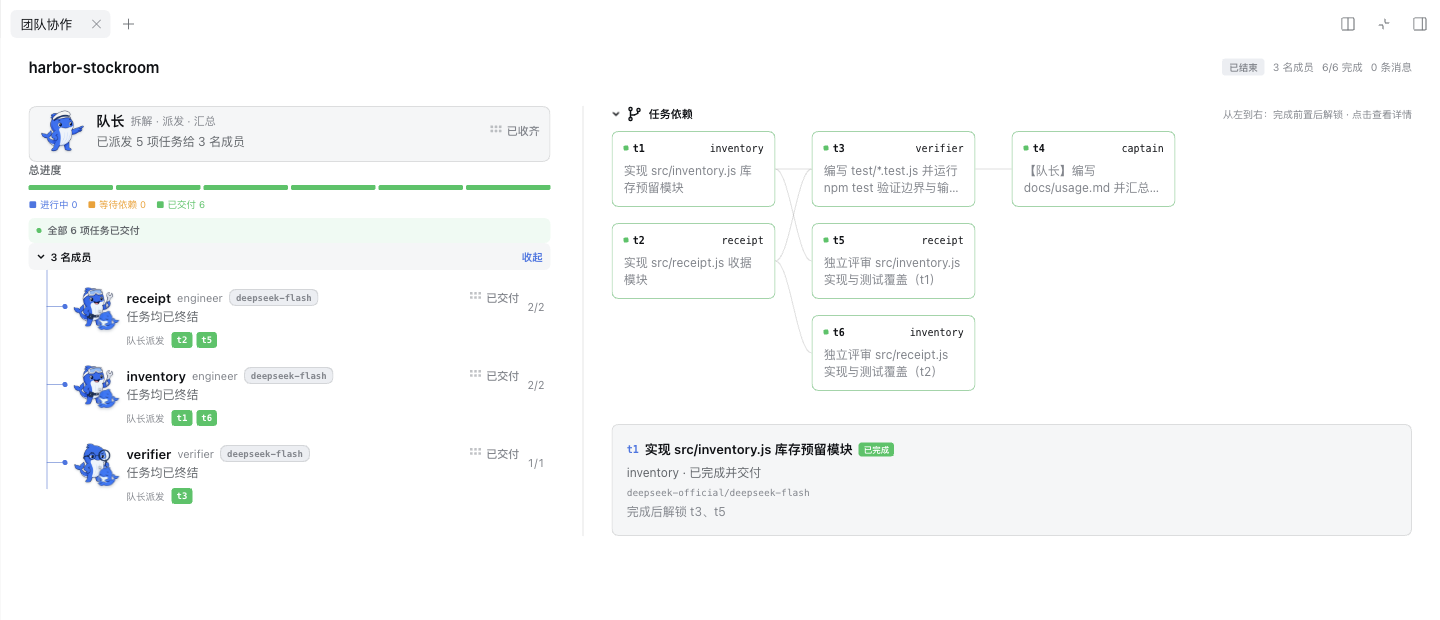
Image from the dsh-agent-teams repository README.
Step 1: Get Each Member Running on Its Own
If any member can't log in on its own or runs out of quota, the whole pipeline stalls, and the error messages are hard to understand. So before you start, test each member one at a time:
I want to build a multi-model team in DeepSeek Harness. The team members will use these command-line tools: [Codex CLI, Claude Code, Gemini CLI, Grok CLI]. Check each one for me, and don't install or log into anything:
1. Is this tool installed on my computer? What is its version number, and what is its full absolute path? (Use which or where to find it.)
2. Can it run "Hello" on its own in the terminal and reply normally? If not, show me the exact error message.
3. Does it support ACP (Agent Client Protocol)? If support requires extra parameters or a separate adapter, tell me what the official docs say to do.
Finally, put the results in a table: tool, path, whether it runs on its own, ACP support, and what else I need to do. I will handle logins myself in the terminal.
You'll need this table during setup. Use the absolute path for each tool. The ACP support status decides whether a member can be connected.
Be especially careful with tools that sign in with a Google subscription. Google doesn't allow using an Antigravity or Gemini CLI subscription login with third-party software to call models, and some people have already had their accounts suspended for it. It's unclear whether having DSH launch these tools counts as a violation, and the official docs don't say. The safe approach is to connect Gemini with an AI Studio API key instead. See Keep Antigravity Working Long Term: Account and Quota Basics.
Step 2: Install the Agent Teams Plugin
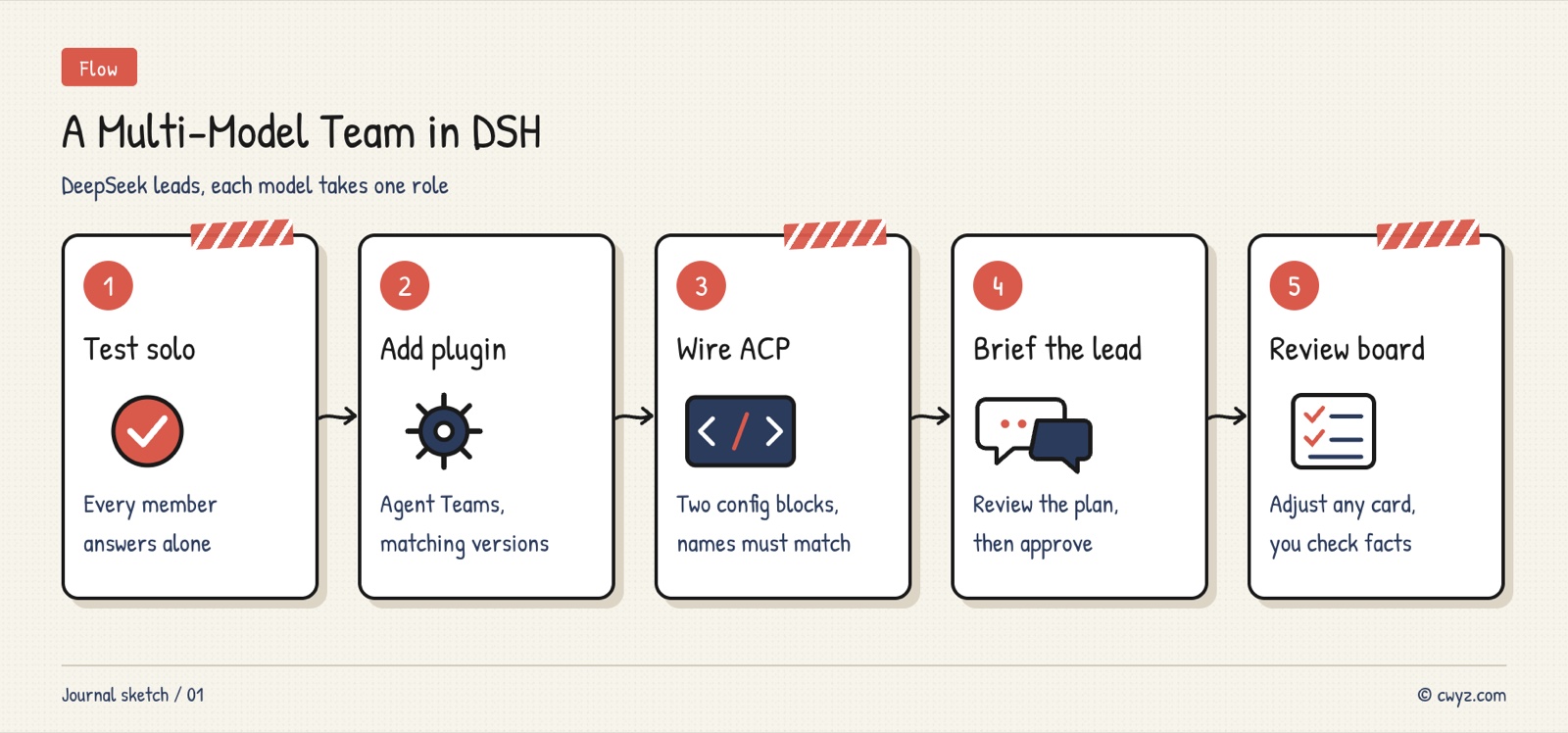
Open the DSH desktop app. In the left sidebar, click Plugins → Add plugin, paste the plugin's GitHub address https://github.com/NanmiCoder/dsh-agent-teams into the input box, and install it. After installation, click Enable now. If it asks you to restart, restart once. Once the plugin is enabled, a collaboration icon appears in the sidebar. Click it to open the task board.
Versions need to match. The plugin author's recommended pairing is DSH 0.2.1-rc.2 with plugin 0.1.30. DSH itself is still a release candidate for now. From the command line, you can have your AI agent check for you:
Help me check whether my DeepSeek Harness and Agent Teams plugin versions match:
1. Check my local DSH version. (In the desktop app, look in the About panel. From the command line, use dsh --version.) Tell me what it is.
2. Open the README and compatibility.json at https://github.com/NanmiCoder/dsh-agent-teams, and check whether my DSH version is on the supported list.
3. If it isn't, tell me which plugin version to install, or which DSH version to upgrade to, and give me the commands. Wait for my approval before running anything.
Do not turn off the compatibility check, and do not change the global install policy to force an install.
Also, the DSH desktop app ships with its own engine. Upgrading the command-line DSH does not upgrade the engine in the desktop app, so check the versions of the two separately.
Step 3: Connect External Agents as Subagents over ACP
This step is the key to the whole setup. For each external agent you connect, add two sections to DSH's patch configuration file. The first section tells DSH how to start the agent and which permission policy to use (from the official package @deepseek-ai/dsh-subagent-acp). The second section registers a "dispatch" tool for the team leader. When the leader calls that tool, the task goes to the matching agent. The two sections are linked by a shared name.
The configuration has a lot of detail, so have your AI agent write it. Your job is to check the result:
Sign in to unlock this key section
New accounts get 10 free credits, plus 1 more each day you sign in (none on days you don't). Spend 1 credit to unlock and it stays open for you.
The prompt above already addresses a few common mistakes. The path must be the real absolute path on your computer. Copying someone else's path means the program won't be found. If the names in the two sections differ by even one letter, the leader won't know how to call the tool. DSH doesn't reload its config automatically, and closing the window isn't enough. You have to fully quit.
About permission: the official default is reject, so a subagent's permission requests, such as reading a file, are automatically denied. Changing it to allow approves those requests automatically. The flow runs more smoothly, but it effectively lets the external agent work freely in your working directory. If you do change it, first create a separate working folder for the team, and keep keys and important files out of it. The official docs also state that when a subprocess starts, it first clears environment variables that look like credentials. Any key the subprocess needs must be passed explicitly by referencing it in env.
Step 4: Give the Team Leader One Master Task
Once every member can reply on its own, you're ready to start. In the main session, use /agent-teams, or just give the leader the task in plain language. By default, Agent Teams first shows you the member roster and the task dependency graph. Work only starts when you click Approve & Run, so this is your chance to adjust the roles.
/agent-teams Put together a team to complete the following. Show me the members and the task plan first, and start only after I approve.
Goal: Write an in-depth article on [topic] for [audience], about [4000] words, with [3] infographics.
Roles:
- Researcher (subagent_grok): Search the discussions and controversies about this topic from the past [7] days, and compile a brief. Every item must include the original link and date. If you can't find something, don't make it up.
- Editor-in-chief ([Claude member's tool name]): Pick well-supported points from the brief and draft an outline. Once the first draft is ready, review it paragraph by paragraph and flag any claims without sources.
- Writer (subagent_gemini): Write the full article following the outline, using only facts from the brief that have sources.
- Designer ([Codex member's tool name]): Pick the key data and comparisons from the final draft, and build them into SVG infographics that can be previewed directly. The numbers in the graphics must match the article text.
Requirements for the leader:
1. After each task is completed, note on the board which file it delivered.
2. If the editor-in-chief rejects a paragraph, send it back to the writer to rewrite. Allow at most two rounds. If it still doesn't pass, stop and ask me.
3. When everything is done, give me the article text, the infographics, a source list, and a list of "claims that still lack sources."
This prompt builds the no-fabrication rule into every role. The editor reviews drafts, the leader acts as the final check, and you get a separate list of unsourced claims so you can verify them before publishing. While the team is working, if a card is heading in the wrong direction, open that card and add an instruction. You don't have to wait until everything finishes.
Step 5: When Something Breaks, Check These Things
My DSH multi-model team has a problem: [paste the symptoms and the exact error message here]. Help me troubleshoot in the order below. Report the result of each check to me before moving on, and don't change anything yet:
1. After changing the config, did I fully quit DSH and reopen it? (Closing the window isn't enough.)
2. Does each command in the config point to a real absolute path on this computer?
3. Do the providerName in each backend section and the provider in the matching tool section match exactly, including case?
4. For the member with the problem, can it reply normally when run on its own in the terminal? Has its login expired, or has it run out of quota?
5. Is permission set to reject? Did the error occur when the agent tried to read a file or run a command?
6. Are the plugin version and the DSH engine version on the official compatibility list?
Once you find the cause, tell me how you suggest fixing it, and wait for my approval before making any changes.
Most problems come from the first four items: not fully restarting, wrong paths, mismatched names, and a member that can't log in on its own.
Notes
- The costs add up across several accounts: each member is billed under its own subscription or API plan. A long article can involve dozens of calls, so try a small topic first to see the total cost.
- Versions change fast: DSH and Agent Teams are both updating frequently. The official README is the source of truth for configuration syntax. Check the compatibility list before you upgrade.
- Don't borrow logins: don't share one subscription's login with other tools. For members that support API keys, use the key.
- Humans still review the final output: however busy the team gets, you still need to do the final fact-check and polish yourself, especially for the real-time information the researcher retrieves.
Comments (0)
No comments yet. Start the conversation.