


What You Will Get
When someone in a group chat says "let's follow each other," there are often dozens of X (Twitter) accounts to open and follow one by one. Doing it by hand is slow, and it is easy to miss some. This tutorial shows a different way. First, collect the accounts in a chain message in the group chat. Then hand the list to an AI agent that can operate a browser. It will follow only 15 accounts per round, skip the ones you already follow, and run one round every 30 minutes until the list is done. Claude and Codex can do this, and so can the Meta Muse browser extension. The article includes 3 copy-ready prompts.
You only handle two things: start the chain in the group chat, and read the report after each round. Clicking Follow, checking for duplicates, and tracking progress are all handled by your AI agent. If it reaches a login or a verification step, it will stop and wait for you.
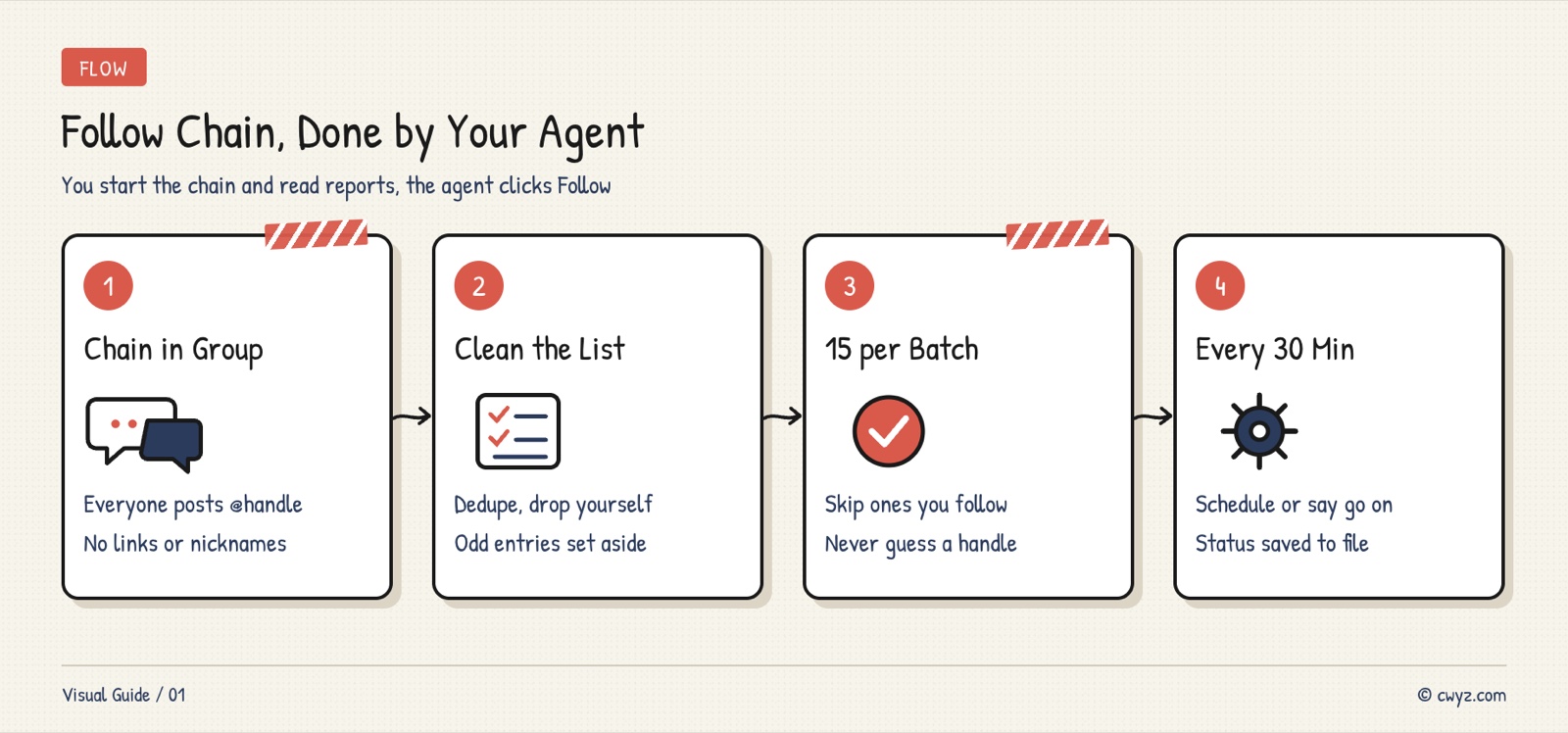
First, collect the accounts in the group chat. Then have your AI agent remove duplicates and turn the chain into a list. Every 30 minutes it follows a batch of 15 accounts. After each batch, it reports the results in three groups: new follows, accounts you already followed, and accounts it could not find.
Why Batches and a Slow Pace
Following hundreds of accounts at once looks a lot like bot activity to X. It can block you from following people for a while, or even lock your account. Following in small batches at a slow pace is closer to how a real person uses X. Here is what the three numbers are for:
- 15 accounts per batch: a small batch is easy to check, and if something goes wrong, only that batch is affected.
- One round every 30 minutes: this leaves a gap between rounds, so you are not clicking Follow dozens of times in a few minutes.
- Skip accounts you already follow: the list often includes people you already follow. Skipping them avoids clicking a button that would unfollow them by mistake.
Step 1: Start the Chain in the Group Chat
Post a chain message in the group chat where you want to follow each other. Use a fixed format, so your AI agent can sort the replies later. You can adapt this text:
[X (Twitter) Follow Chain]
Friends who want to follow each other, copy this message and add your X username on a new line at the end, in the format @username (no links, no display names).
I will give the list to my AI agent so it can follow everyone slowly. If you see this, please follow back.

1. @your_username
Usernames must start with @ and use the English handle, such as @demo_lin, not the display name. Some people will post a profile link or another website address. Your AI agent cannot read those as usernames, so they will go under "Wrong format" in the list. You can ask those people for their username privately.
When the chain has enough replies, copy the whole message and save it as a text file, or paste it straight into your AI agent.
Step 2: Get Your Browser and AI Agent Ready
Follows must come from your own logged-in X account. That means your AI agent has to operate your own browser:
- Log in to your X account in Chrome.
- Choose an AI agent that can control a browser. Claude uses the Claude in Chrome extension, Codex uses the browser feature in the ChatGPT desktop app, and Meta Muse uses its Chrome extension.
- The first time you use it, the extension will ask whether it may access x.com. Click allow.
If you have not set up an AI agent yet, read the beginner guide to AI agents first. To learn what the Muse browser extension can do, read this news post.
Step 3: Have Your AI Agent Clean Up the List
Do not follow anyone yet. First, have your AI agent tidy up the chain so you can check it:
Below is the X follow chain from our group chat. Please turn it into a follow list for me:

1. Extract every @username, and remove any extra text and spaces around the @ sign
2. If a username appears more than once, keep only one. If my own username [your username] is in the list, remove it (you cannot follow yourself)
3. Anything not in @username format (links, display names, blank lines) goes into a separate "Wrong format" group. Do not guess which account it is
4. Save the cleaned list as follow-list.md, one username per line, with a "Status" column after it. Set every status to "To follow"
5. Tell me the total count and which entries have the wrong format

Stop when done and wait for me to confirm the list is correct.

[paste the chain content]
Having the agent list "Wrong format" entries separately, instead of guessing, matters because one letter off in a username means a different person. If the agent guesses wrong, you could follow a stranger. With a cloud agent like Muse that cannot reach local files, change step 4 to "write the list directly in the chat."
Step 4: 15 Accounts per Batch, Every 30 Minutes
Once you have confirmed the list, give your AI agent the prompt below. This is the core of the whole process:
Sign in to unlock this key section
New accounts get 10 free credits, plus 1 more each day you sign in (none on days you don't). Spend 1 credit to unlock and it stays open for you.
After each account, the agent writes its status back to the list file. If the process is interrupted, nothing is lost. The next round picks up from the remaining "To follow" entries, so it does not click the same button twice and does not skip anyone.
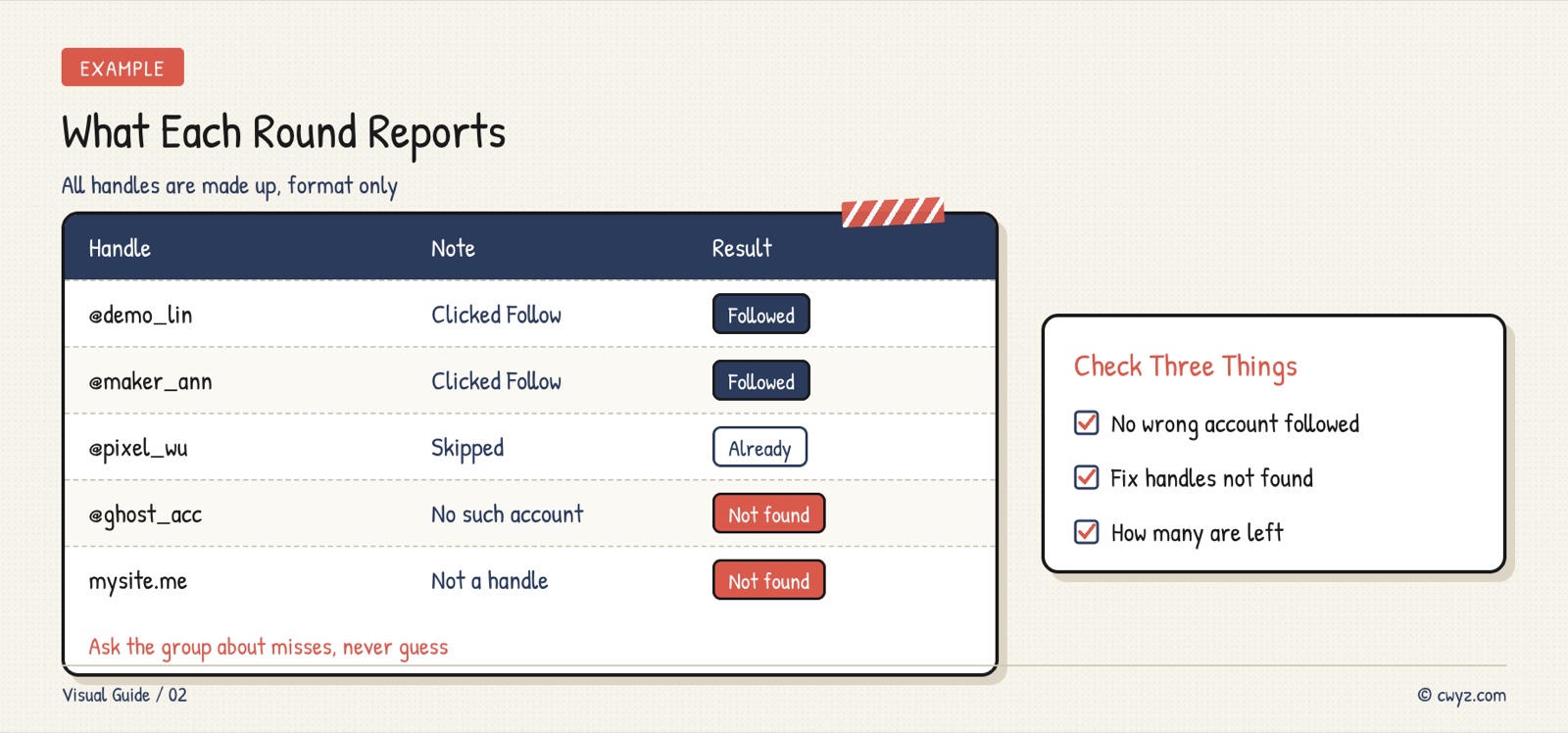
The image above shows what a round report looks like after one round. The accounts are fictional. If you see entries under "Not found," ask the group chat whether those usernames were typed wrong. Fix them and add them back to the list.
Step 5: Wrap Up and Follow Back
When the whole list is done, have your AI agent summarize the three groups in one message and post it in the group chat. That way, everyone can see whether they were followed. If anyone was not followed, they can send their username again. Follows work both ways, so after you follow others, also remind them to follow you back from the chain list.
While you are at it, follow this site's X account @daniel393939. New tutorials and useful agent tips appear there first, and you can also add it to the chain list.
Notes
- Accounts can be at risk: X limits large numbers of follows in a short time. The exact daily limit is in the X Help Center, and I have not verified it yet. X rules also discourage using automation for mass follows to grow followers, which can lead to rate limits or even a suspended account. For a long list, do not run too many rounds in one day, and decide for yourself whether to do it.
- Only follow people who signed up: the list should come only from people who chose to follow each other by replying to the chain. Do not batch-follow people from someone else's follower list.
- Turn off scheduled tasks: if you set a task to run every 30 minutes, check that it has stopped once the list is done.
- You handle logins and verification: your AI agent should not enter your password or pass a human verification check for you. If it reaches one, it should stop and wait for you.
Comments (0)
No comments yet. Start the conversation.