

What you get
With the open-source lemo-animi plugin, your AI agent can turn one story into a stop-motion short film from 20 seconds to 2 minutes long. The look is handmade, like clay or felt. The film comes with an original soundtrack and collision sounds, and you can add narration and subtitles in English or Chinese. You don't need to draw or edit, and you don't need a video generation model. The guide includes 3 prompts you can copy.
Here's how the work splits: you bring the story, pick the style, and review the film. Your AI agent handles everything else.
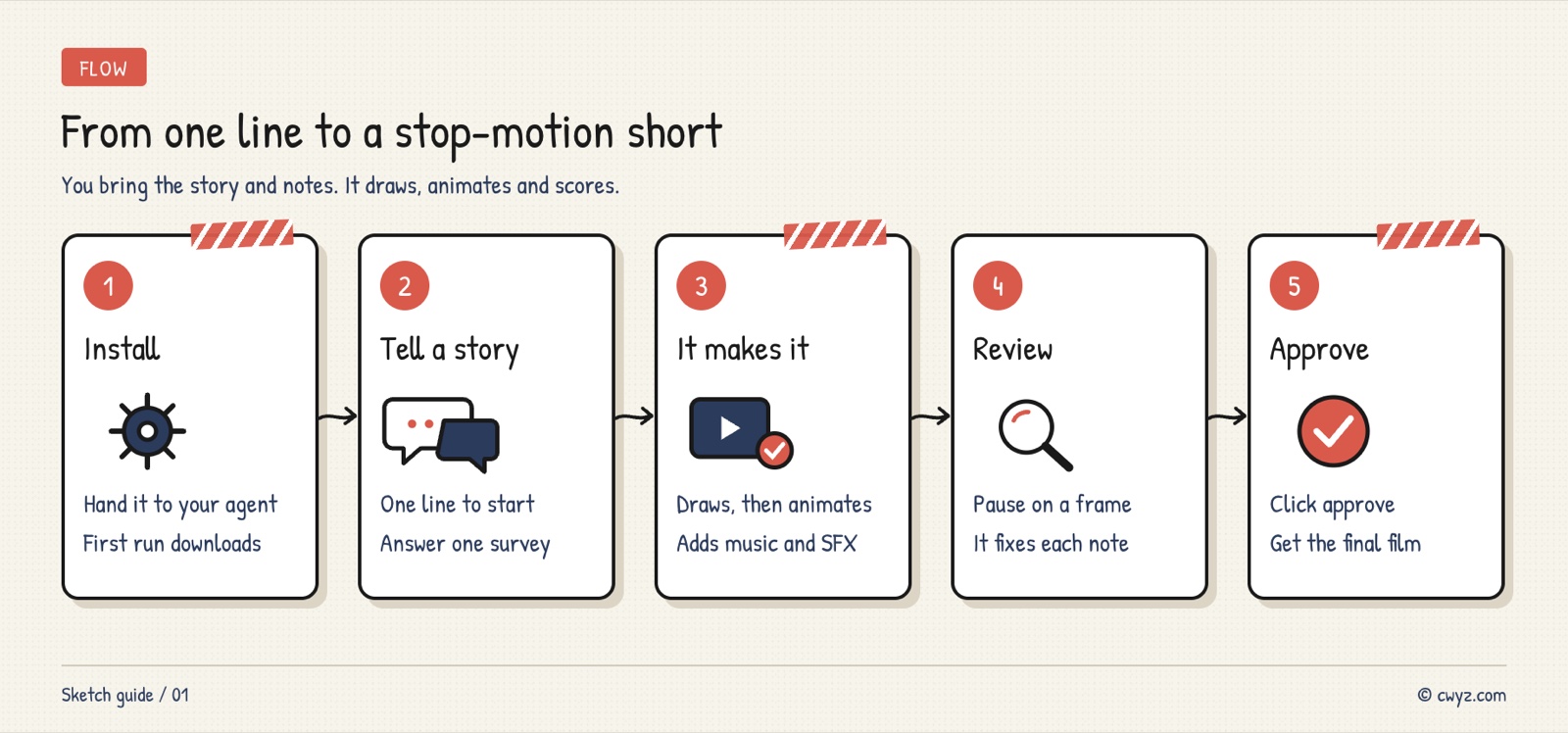
There are five steps. Have your AI agent install the plugin, describe your story in one sentence and answer a short list of questions, wait while it makes the film, leave notes in the review desk at the frame where something looks wrong, and approve the film to get the final version.
Why it looks like a real stop-motion film
Traditional stop-motion means posing a clay figure, taking a photo, moving it a little, and taking another photo. That is why the motion looks choppy, and that handmade feel is the charm. lemo-animi splits the work into two parts:
- Drawing handles the look: Codex's built-in image generation draws the character from the front, side, and back, along with eight frames of motion and a background, all in the same material. The artwork has transparent backgrounds.
- Code handles the motion: Python places the action frames one by one over the background. Each picture holds for two or three frames, and the camera moves in and out, with shadows and light beneath the feet.
- Sound is made separately: The music is built from recordings of real instruments, and each collision has its own sound effect.

Image from the project's README. From left to right: the character sheet, the action sheet, the set, and a close-up of the composited shot.
Step 1: Have your AI agent install the plugin
lemo-animi mainly runs in Codex, and Codex paints every picture itself. Claude Code can install it too, but Claude Code can't draw images on its own, so it needs to borrow Codex or another image tool on your computer. If you are new to Codex, start with Let Codex Do the Work in the ChatGPT Desktop App.
Send this to your AI agent:
Please install the open-source stop-motion plugin lemo-animi (GitHub: lemomo-ai/lemo-animi), following the install steps in its README.

1. First, check my computer. Is the system macOS or Linux? Is ffmpeg installed? Is Python 3.11 to 3.13 available, or is uv? Tell me what's missing, and ask me before you install anything.
2. If you are Codex, install it the Codex way. If you are Claude Code, install it the Claude Code way. For Claude Code, also check whether a Codex that can generate images is installed and logged in on this computer. If it isn't, tell me which options I have.
3. Tell me how much will be downloaded for the first film and which folder it will go in. Wait for my approval before you download anything.
4. After the install, tell me whether I need to restart the conversation, and whether the model and reasoning level I'm using now are good enough.
5. Report everything in plain language. If you're unsure about something, ask me a multiple-choice question.
Item 3 matters most. The first film needs to download about 1.7 GB of runtime files and instrument recordings. They go in the lemo-animi-env folder in your home folder, and you won't need to download them again later. If you have both Codex and Claude Code installed, they share the same copy.
For the model, the author suggests one of the GPT-6.2 pair in Codex (Sol or Astra) and a reasoning level of High or above. For the difference between the two models, see GPT-6.2 Astra and Sol Arrive with a Cheaper Flagship.
Step 2: Pick a material
There are eight materials to choose from. Each one comes with its own drawing style, lighting, camera work, and soundtrack style. Just name the one you want.
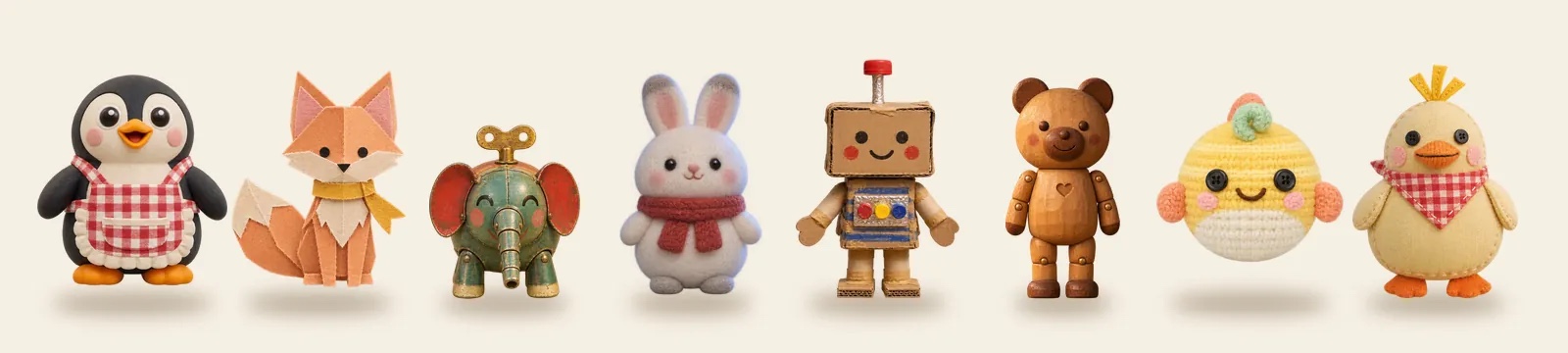
Image from the project's README.
| Material | What it looks like | Good for |
|---|---|---|
| Clay | Modeling clay, with exaggerated faces that squash and stretch | Silly, noisy little stories |
| Papercraft | Layers of cardboard stacked up, with light glowing through from behind | Quiet, dreamy fairy tales |
| Tin toy | Old wind-up tin toys with jerky movement | Nostalgic stories with a bit of mechanical flair |
| Felt | Fluffy, needle-felted wool | Winter, warmth, and healing stories |
| Cardboard | Shipping boxes, tape, and markers | Kids' imaginary worlds and deadpan comedy |
| Wooden puppet | Varnished jointed wooden puppets | Late-night stories by the lamp, about slowly waking up |
| Crochet | Yarn dolls in candy colors | Lively, cute group scenes |
| Patchwork fabric | Printed cloth, buttons, and stitching | Pastoral tales and small road-trip adventures |
Not sure which to pick? Open the project's gallery. Every material has a sample film of about one minute.
Step 3: Start with one sentence and answer the questions
Once it's installed, open a new conversation. The simplest start is one sentence, such as "Make a 30-second animation in Cardboard style about a robot that wants to learn to dance." Your AI agent will ask all the questions you left out at once: style, length, landscape or portrait, narration, opening and closing credits, and whether it should show you the characters first. If you don't want to think too hard, just reply "all defaults."
To give the story more shape, spell it out when you start. Use this prompt:
Sign in to unlock this key section
New accounts get 10 free credits, plus 1 more each day you sign in (none on days you don't). Spend 1 credit to unlock and it stays open for you.
The story line follows the order of want, failure, low point, turning point, and surprise. Short films hate flat storytelling, and these beats match the sections the agent uses when it writes the shot list. The last item, "show me the characters first," makes the agent pause once in the middle. That suits a first try, or when you worry the characters won't look the way you want.
Longer films have more shots and more images to draw, so they take longer to make:
| Length | Shots | Images to draw |
|---|---|---|
| 20 seconds | 2 to 4 | About 10 to 14 |
| 40 seconds (default) | 5 to 8 | About 20 to 26 |
| 60 seconds | 6 to 12 | About 30 to 38 |
| 2 minutes | 12 to 22 | About 55 to 68 |
For a first try, start with 20 to 40 seconds, check the result, and then go longer.
Step 4: Leave notes in the review desk
When the film is done, a review desk opens in your browser. The film plays in the center. A strip of film runs along the bottom, divided by shot, and your notes appear on the right.
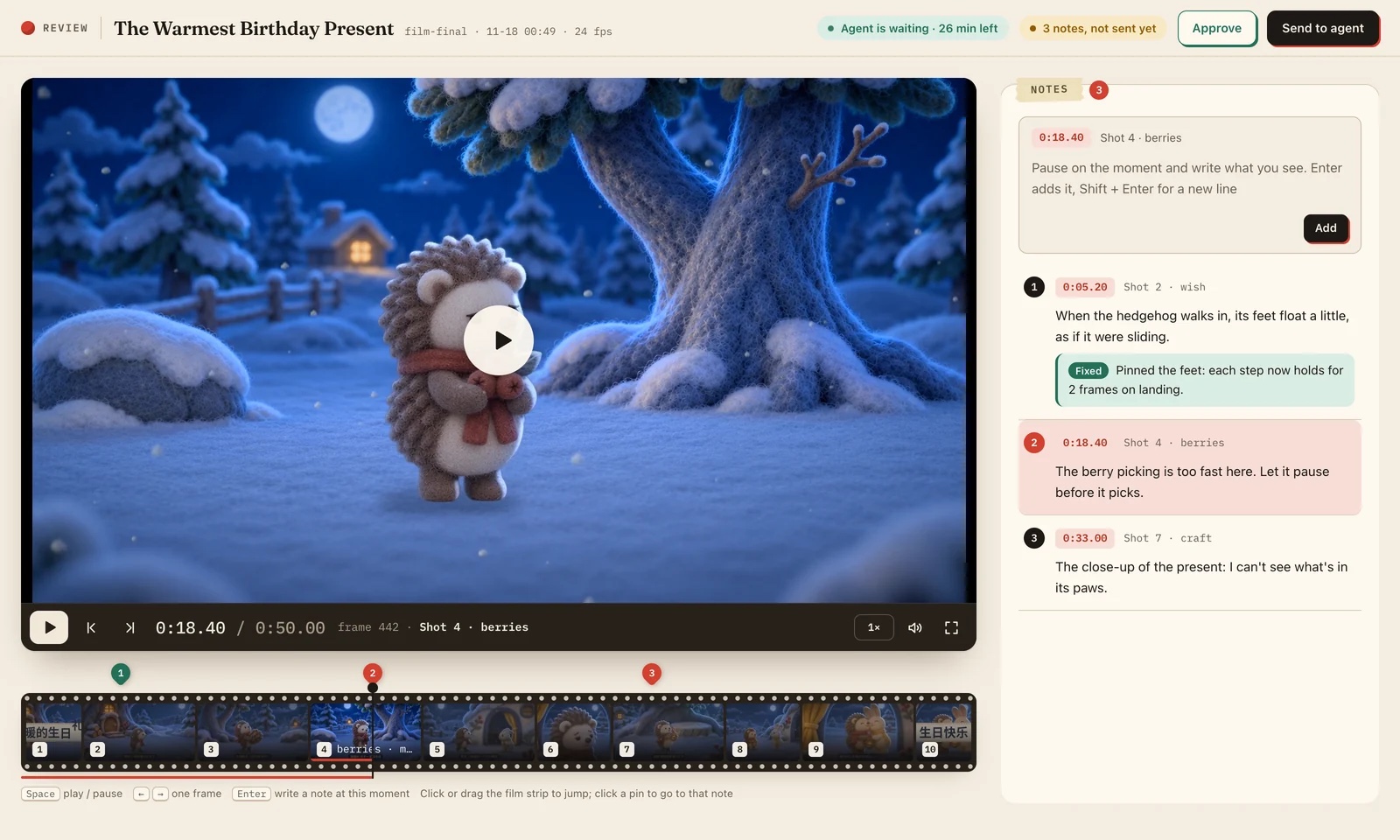
Image from the project's README.
You only need to do four things:
- Find the frame that looks wrong: Press the space bar to play or pause, and use the left and right arrow keys to move one frame at a time.
- Press Enter to leave a note: For example, "the feet float when it walks" or "this part is too fast, so pause here." The timecode and the shot number are recorded automatically.
- Click "Submit to agent": Your AI agent handles your notes one by one. Under each note, it explains what it changed. When the new version is ready, the page tells you to refresh.
- Click "Approve" when you're happy: The agent delivers the film.
At the top of the page, you can see how long the agent will wait for you, up to 30 minutes. Missing that window costs you nothing, because your notes are saved as you write them. After you submit, go back to the conversation and say "I'm done reviewing," and the agent will keep making changes. If you close the page, that's fine too. Just ask the agent to open it again.
Step 5: Get the final film
After you click "Approve," the final film is saved in the film folder the agent created in your working directory. The default is 1920×1080 at 24 frames per second. Portrait is 1080×1920, and square is 1080×1080. The same folder also holds a production log and a thumbnail of every shot. If you added narration, there is also a subtitle file.
To make another film, ask the agent to reuse what it already set up this time:
Make another film with lemo-animi, using the same settings as the last one (material, frame shape, narration language). Only change the story: [one-sentence new story]. Pay attention from the start to the notes I left on the last film during review, for example the pacing and keeping the feet on the ground.
Two tips for Claude Code users
- Switch to auto mode: A film takes hundreds of operations, and in normal mode you have to approve each one. In Claude Code, press Shift+Tab until auto appears in the status bar at the bottom. You don't need to turn off permission prompts entirely. For what auto mode blocks for you, see What Claude Code's Auto Mode Actually Blocks for You.
- Borrow an image tool: By default, the plugin calls the Codex you're logged into on this computer to draw. You can also connect your own image tool, but all the sample films were drawn with Codex. No one has tuned the results for other models, and the transparent backgrounds may not come out clean.
If you want a film drawn entirely with code and no image generation, the same author has another tool. See Claude can make a short film with every number right, even if you can't edit.
Notes
- Not for commercial use: lemo-animi is licensed under CC BY-NC 4.0. It's free for personal, non-commercial use, and you must credit lemo-animi by Lemomo (LemoLab). If you use it for ads, paid client work, or a channel that earns money, buy a commercial license from the author first.
- Your narration text goes to Microsoft: Narration uses Microsoft Edge's online voices, so don't put private information in the narration text.
- It needs internet access and permissions: Narration needs an internet connection, and the review desk runs a web server on your computer. Don't lock Codex into a read-only or offline setting. The agent will ask for any missing permissions before it starts.
- The first version has rough edges: The author says this is the first release. If you run into a problem, you can open an issue in the repository. Several styles, such as shadow puppetry and paper cutting, are still being tested and will come later.
Comments (0)
No comments yet. Start the conversation.